

Close Menu

    Subscribe to Updates

    Get the latest creative news from FooBar about art, design and business.

    What's Hot

    U.S. and Iran at odds over uranium enrichment, Strait of Hormuz tolls

    China to expand public service access for migrant workers

    False Alarm on Google Killing Updates for Chromecast Devices

    Facebook X (Twitter) Instagram
    Facebook X (Twitter) Instagram Pinterest VKontakte
    Sg Latest NewsSg Latest News
    • Home
    • Politics
    • Business
    • Technology
    • Entertainment
    • Health
    • Sports
    Sg Latest NewsSg Latest News
    Home»Technology»False Alarm on Google Killing Updates for Chromecast Devices
    Technology

    False Alarm on Google Killing Updates for Chromecast Devices

    AdminBy AdminNo Comments2 Mins Read
    Facebook Twitter Pinterest LinkedIn Tumblr Email
    Share
    Facebook Twitter LinkedIn Pinterest Email


    There’s some confusion in the world of Chromecast devices and whether or not they are still receiving critical security updates, thanks to a reddit post that was picked up and spread.

    A user there noticed that Google had changed the status of almost all Chromecast devices and that they had “reached end of life today or yesterday.” They didn’t say what exactly changed, but I’m assuming they noticed a switch from “Yes” to “No” in a column that showed the status of a device “Currently receiving critical security updates.” According to their post, the Chromecast (2nd gen), Chromecast Audio, Chromecast Ultra, Chromecast (3rd gen), and Chromecast with Google TV (4K) were all moved to “No,” signaling that they were no longer expected to see critical security updates. The only device not mentioned was the Chromecast with Google TV (HD) model.

    However, they didn’t include proof of the change, but we went to confirm moments ago and all of the Chromecast devices on the list currently say “Yes,” that they are all still receiving critical security updates. The only device not is the original Chromecast (1st gen).

    And since Google foolishly killed off Google Cache a few years back, finding these minor changes is almost impossible today unless you are actively tracking the page. This is not a page we track, so it’s tough to say what Google changed here.

    Here’s a current screenshot of the page:
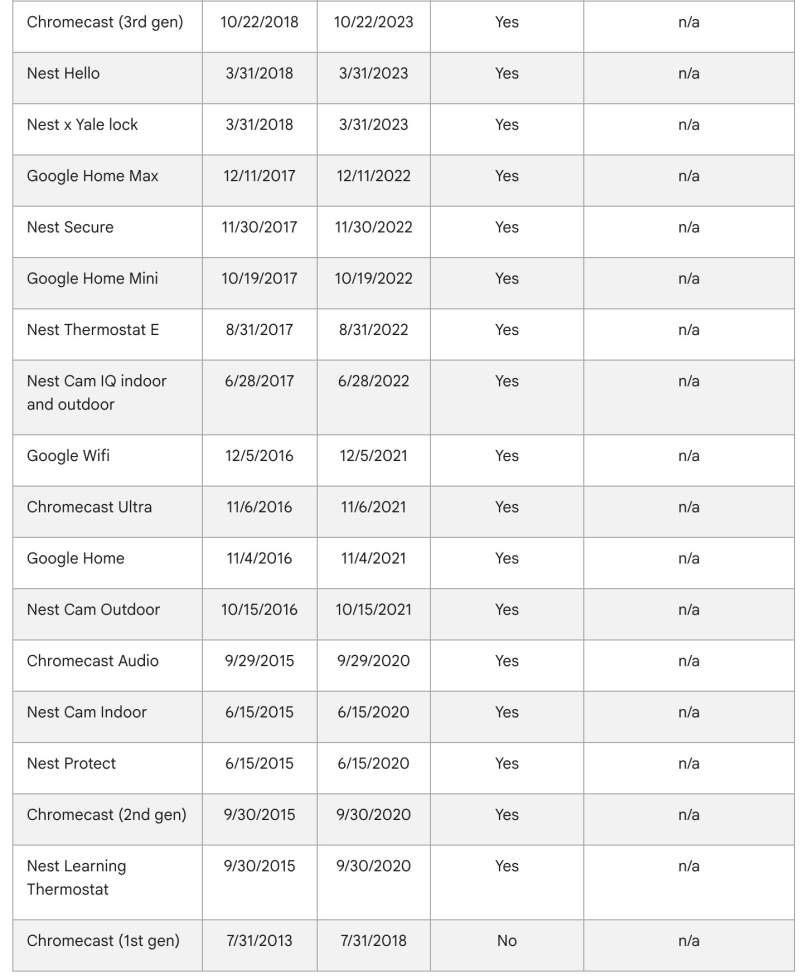
    You can view the Google support page yourself, but we included the bottom portion starting with Chromecast (3rd gen) that still says “Yes.” You can also see the same status for Chromecast Ultra, Chromecast Audio, and Chromecast (2nd Gen). The “Yes” column is the “Currently receiving critical security updates” column.

    My guess is that a Googler mistakenly changed these and has since flipped them back after the change made headlines.

    I miss Google Cache.

    Share. Facebook Twitter Pinterest LinkedIn Tumblr Email
    Admin
    • Website

    Related Posts

    15 Best Under Desk Cable Trays for 2026

    Xiaomi’s new $34,500 electric SUV goes farther than a Tesla Model Y and costs less

    Google adds Android app generation and Managed Agents to Gemini developer tools

    Fujitsu finally thrown out of Post Office in £500m Horizon replacement deals

    Add A Comment
    Leave A Reply Cancel Reply

    Editors Picks

    Electrical fire to keep theater that hosts ‘The Book of Mormon’ closed through May 17

    The 2026 Grammy Award nominations are about be announced. Here’s what to know

    Disease of 1,000 faces shows how science is tackling immunity’s dark side

    Judge reverses Trump administration’s cuts of billions of dollars to Harvard University

    Top Reviews
    9.1

    Review: Mi 10 Mobile with Qualcomm Snapdragon 870 Mobile Platform

    By Admin
    8.9

    Comparison of Mobile Phone Providers: 4G Connectivity & Speed

    By Admin
    8.9

    Which LED Lights for Nail Salon Safe? Comparison of Major Brands

    By Admin
    Sg Latest News
    Facebook X (Twitter) Instagram Pinterest Vimeo YouTube
    • Get In Touch
    © 2026 SglatestNews. All rights reserved.

    Type above and press Enter to search. Press Esc to cancel.