

Close Menu

    Subscribe to Updates

    Get the latest creative news from FooBar about art, design and business.

    What's Hot

    Hugh Jackman in a Truly PG-Rated Murder Mystery

    ‘One of the Greatest Leaders’: How Bobby Cox Left a Lasting Impression on His Players

    Tennessee redistricting plan splits Memphis neighbors and reshapes midterms as other states follow

    Facebook X (Twitter) Instagram
    Facebook X (Twitter) Instagram Pinterest VKontakte
    Sg Latest NewsSg Latest News
    • Home
    • Politics
    • Business
    • Technology
    • Entertainment
    • Health
    • Sports
    Sg Latest NewsSg Latest News
    Home»Technology»What is Click To Do? Meet Microsoft’s next AI headliner for Windows PCs
    Technology

    What is Click To Do? Meet Microsoft’s next AI headliner for Windows PCs

    AdminBy AdminNo Comments2 Mins Read
    Facebook Twitter Pinterest LinkedIn Tumblr Email
    Share
    Facebook Twitter LinkedIn Pinterest Email


    Click To Do lets you feed text to AI models

    Click To Do uses optical character recognition (OCR) technology to scan your current screen and make text selectable. Basically, it’s taking a screenshot and letting you interact with elements within it.

    For example, if you select an email address, the Click To Do menu presents “Send email” to compose an email. If you select a website URL, you can choose “Open website” to launch it in your default web browser. (Thankfully, this doesn’t always use Microsoft Edge!)

    If you select over 10 words of text, things get more interesting. You’ll get a variety of actions that use the Phi Silica language model that runs on your Copilot+ PC’s NPU to perform actions like summarizing text, creating a bulleted list, or rewriting the text in different tones.
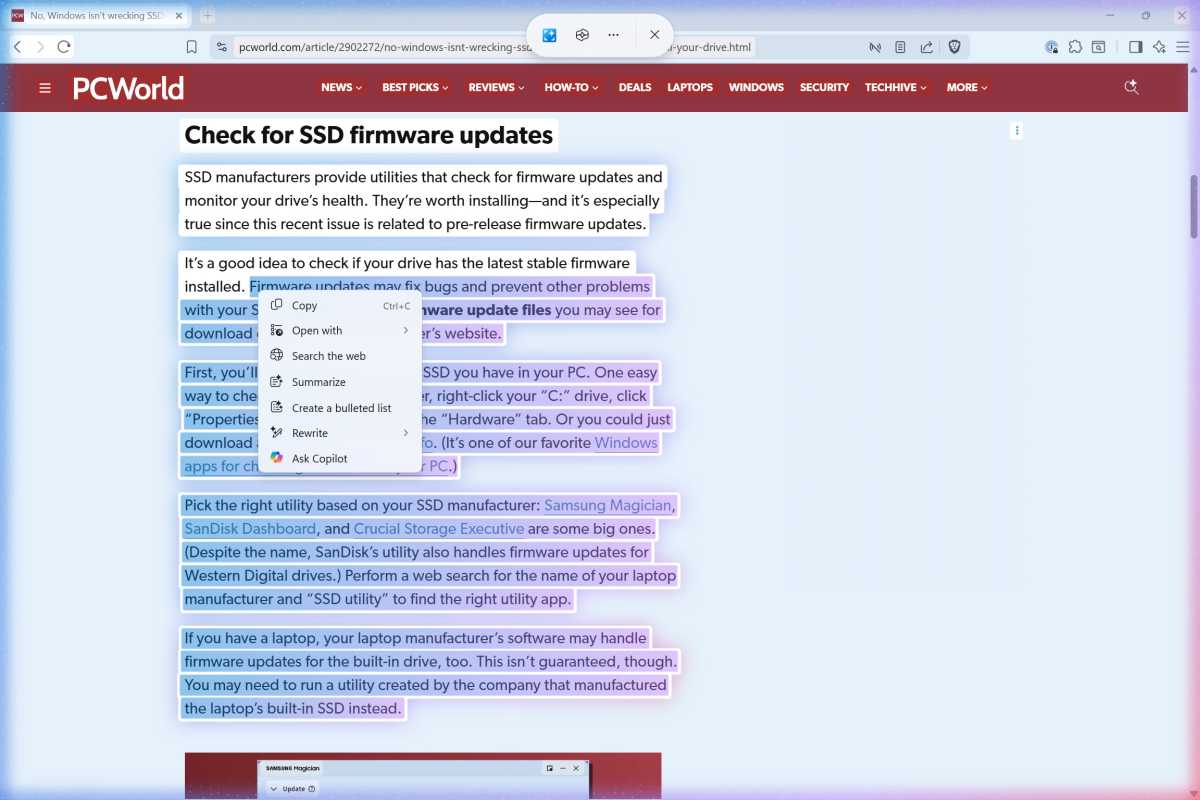
    Windows 11 Click To Do text actions screenshot

    Chris Hoffman / Foundry

    This is one of Microsoft’s first attempts at integrating NPU-powered text actions on a Copilot+ PC. Because it’s based on a screenshot, you can only send so much text to the language model at once.

    That should improve the experience, because let’s be honest: those local language models that run on your Windows PC are nowhere near as powerful as a cloud-based large language models like ChatGPT. (If you’re using a chatbot app in your browser, you’ll wonder why you’re bothering to use a worse app that runs entirely on your PC. That’s a core problem with so many Copilot+ PC local AI features.)
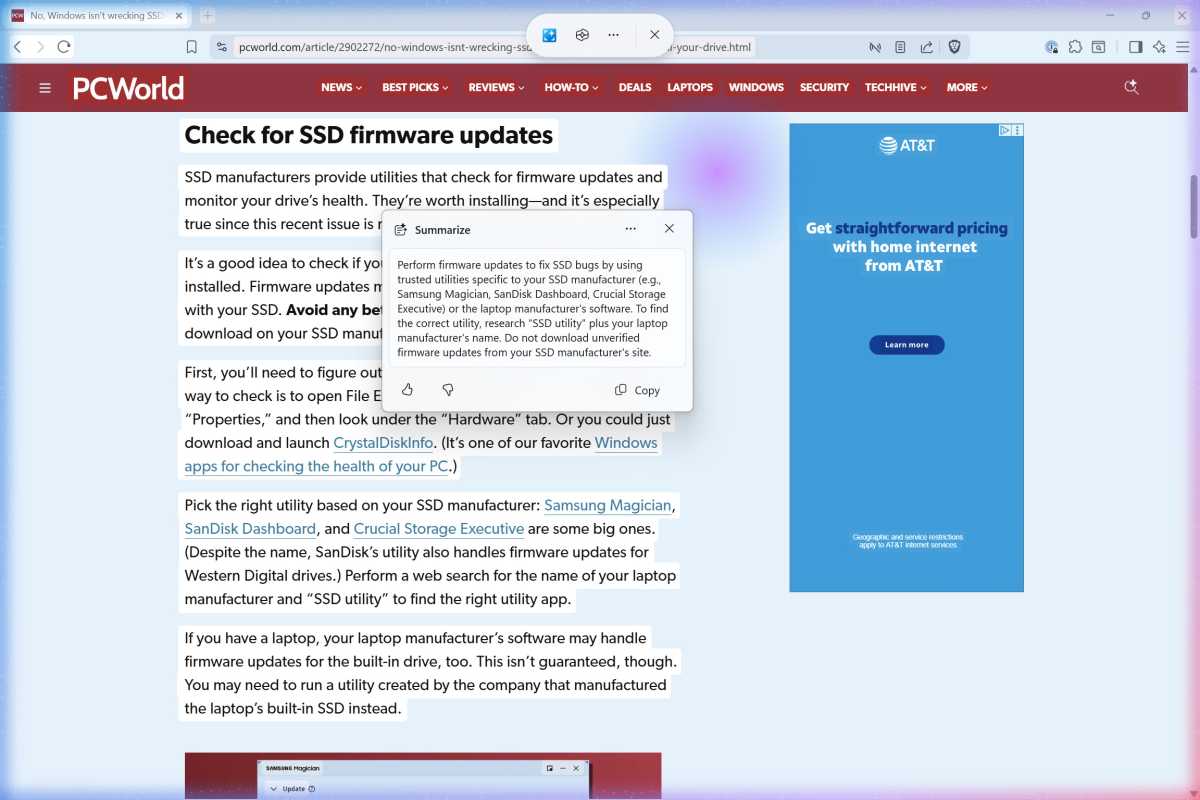
    Windows 11 Click To Do summarized text screenshot

    Chris Hoffman / Foundry

    There’s also an “Ask Copilot” action that will send your selected text to Microsoft’s Copilot AI chatbot, and a “Draft with Copilot in Word” action to start working on a Word document with Microsoft’s AI.

    You can send information to a chatbot in the cloud here, too—but only if you’re using Microsoft’s Copilot (for home users) or Microsoft 365 Copilot (for businesses). Yeah, I know, it can be confusing.

    Share. Facebook Twitter Pinterest LinkedIn Tumblr Email
    Admin
    • Website

    Related Posts

    Denon Home series speakers review: Siri & superior sound

    Google settles racial discrimination lawsuit for $50 million

    Access Denied

    More people are using AI for retirement planning, but how accurate is it? Here’s what experts say.

    Add A Comment
    Leave A Reply Cancel Reply

    Editors Picks

    Electrical fire to keep theater that hosts ‘The Book of Mormon’ closed through May 17

    The 2026 Grammy Award nominations are about be announced. Here’s what to know

    Disease of 1,000 faces shows how science is tackling immunity’s dark side

    Judge reverses Trump administration’s cuts of billions of dollars to Harvard University

    Top Reviews
    9.1

    Review: Mi 10 Mobile with Qualcomm Snapdragon 870 Mobile Platform

    By Admin
    8.9

    Which LED Lights for Nail Salon Safe? Comparison of Major Brands

    By Admin
    8.9

    Review: Xiaomi’s New Loudspeakers for Hi-fi and Home Cinema Systems

    By Admin
    Sg Latest News
    Facebook X (Twitter) Instagram Pinterest Vimeo YouTube
    • Get In Touch
    © 2026 SglatestNews. All rights reserved.

    Type above and press Enter to search. Press Esc to cancel.