



Vivaldi’s browser version 7.6 includes what the company is calling The Tab Button, a way to search, organize, and manage your active tabs similar to your search history.
Let’s face it: Over time, chances are you just keep adding tabs to your browser window. They grow, expand, and even duplicate. I manage it by extracting a tab, like a seed, which sprouts related tabs. Pruning never really seems to work; my strategy is to take a overgrown browser window, slash half of it, or alternatively fell the whole thing and start anew.
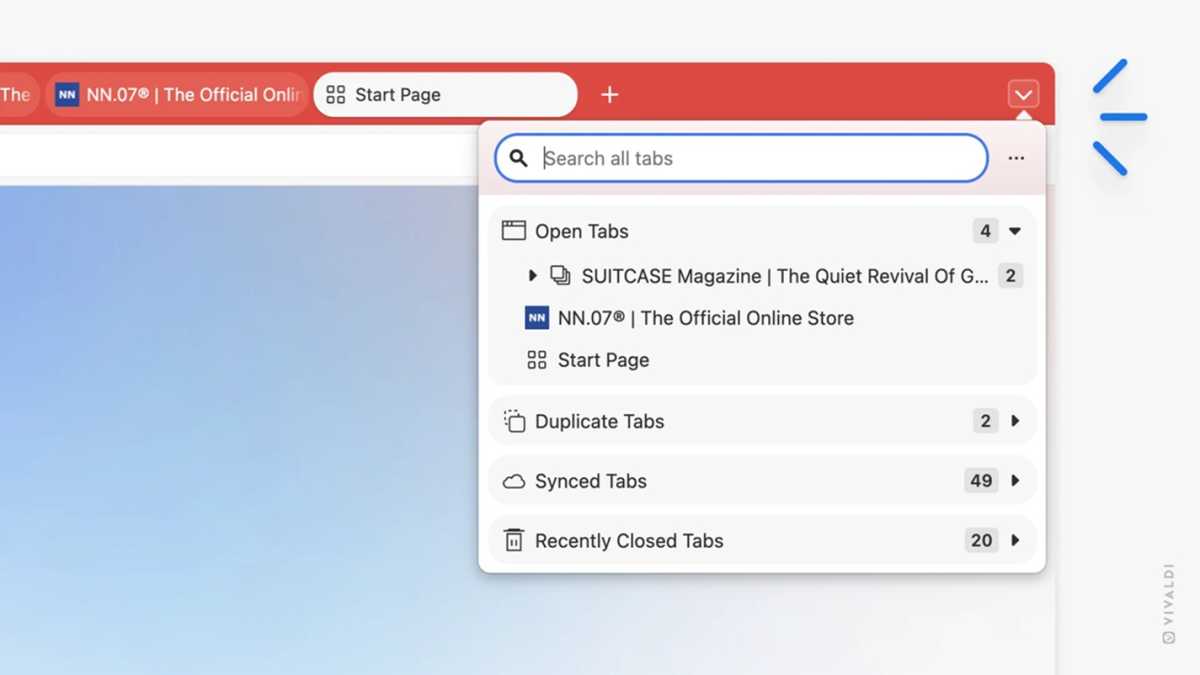
Vivaldi’s taking a different approach. The Tab Button in Vivaldi’s free Windows browser appears to replace the traditional “X” at the upper right-hand corner of a browser window, replacing it with a drop-down menu. While your tabs remain the same across Vivaldi’s various windows, the Tab Button organizes them into open tabs, duplicate tabs, and recently closed tabs. There’s a search box at the top.
“Start typing, and you’ll filter across the things you care about: your open tabs, synced tabs, and your recently closed ones, all in one view,” Vivaldi said. “Hit Enter to jump, or click to restore. The gain is flow: fewer detours, less hunting, more doing.”
Vivaldi
Vivaldi 7.6 and its Tab Button is just another iteration on Vivaldi’s organization scheme, which has allowed you to place your browser tabs at the top, bottom, left, or right, organize them into tab groups and workspaces, sync tabs between devices, and more. It’s worth noting that you can already search your tabs within the Vivaldi browser, although that’s a dedicated command that is hidden in the upper left-hand corner, not the right. (What you might not know is that the current Vivaldi tab search function searches every tab that’s open on your screen — even those from another browser, like Microsoft Edge.)
Vivaldi makes the valid point that highlighting and cleaning up duplicate tabs eases the burden on your PC as well as your mind. Vivaldi has taken pains to note that it’s not using AI in the traditional sense — such as how Microsoft embeds Copilot into Edge — but simply trying to smartly organize what you’re working on so that you can find it. Vivaldi said as much in a recent manifesto of sorts, coming out strongly against AI. (To be fair, some embedded “AI” browser functions, such as real-time speech translation, seem pretty useful.)
Vivaldi has also implemented its search functions in the address field, so that you can search for an open tab by using the “@tabs” (or “@history”) term to identify a tab.
Finally, Vivaldi 7.6 has improved its ad blocker, “automatically closing sneakily-opened tabs or windows that sell you something,” and has added the ability to swipe left or right on a trackpad or touchscreen to navigate back and forth within the web browser.
