



At a glance
Expert’s Rating
Pros
- 80Gbps USB4
- Fantastic performance
- Finned, heat-shedding design
- Backwards compatible with USB 2
Our Verdict
We had nothing but love for the 40Gbps 1M2, so were certainly not going to complain that it’s now the 80Gbps 1M2 80G. It ain’t cheap, but it’s easily the fastest external SSD we’ve seen.
Price When Reviewed
This value will show the geolocated pricing text for product undefined
Best Pricing Today
Price When Reviewed
$219 (case only) | $349 (1TB) | $499 (2TB) | $699 (4TB) | $1,299 (8TB)
Best Prices Today: 1M2 80G
In my review of the first Express 1M2 for PCWorld, I was stoked that uber-fast USB4 storage was finally at hand. In Macworld’s review, it was touted that SSDs don’t get much better than this. At the time, that was true. Now it’s not, thanks to the 1M2 80G.
By the last three letters in the moniker, you might guess that the new model is 80Gbps. It is. It’s also USB4 80Gbps, so unlike Thunderbolt 5, it can also function on any USB port. It’s fast. We like it.
OWC 1M2 80G: Features
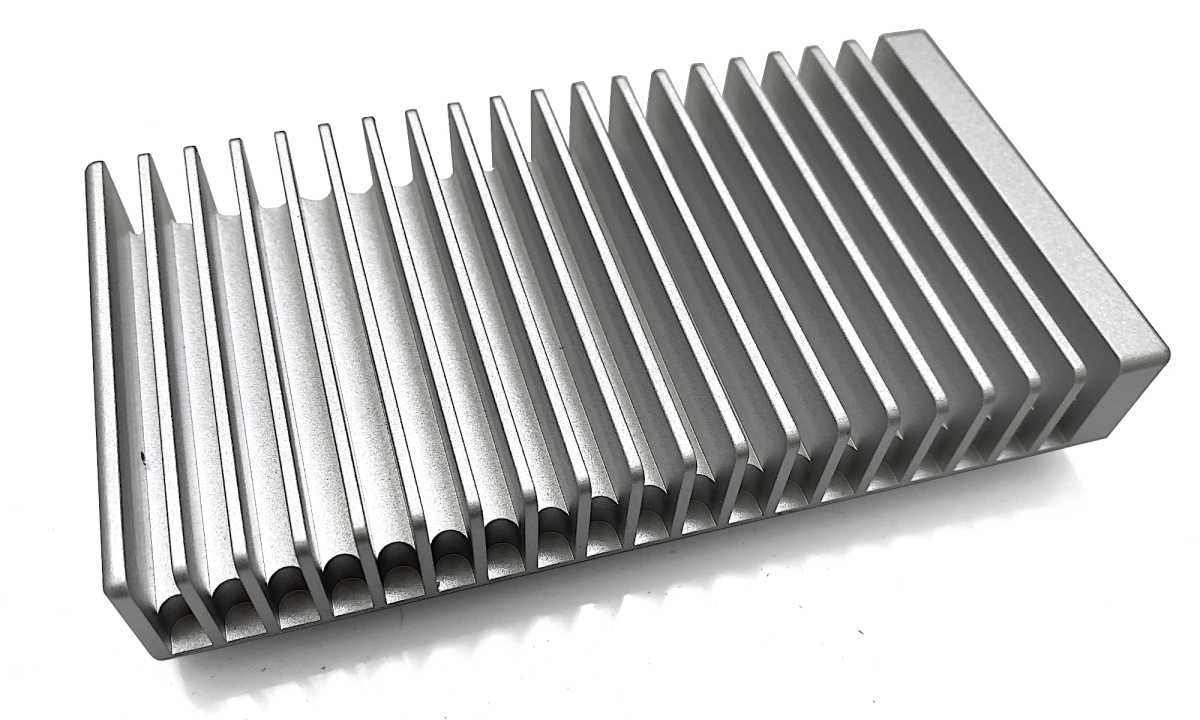
Though it looks almost identical to the older 1M2 (basically a large silver heatsink with an NVMe SSD inside), the 80G is slightly different. The silver color is a bit brighter, and the Type-C port on the business end is offset to one side. The non-business end has the logo and power/activity light.
The 80G is the same 5.25 inches long and 2.75 inches wide as the original, but is taller at around 0.9 inches, compared to 0.75 inches. It’s also about .5 ounces heavier at 9.9 ounces. It’s nicely hefty in my book, but tastes vary.
OWC
The SSD inside our test unit was a 2TB PCIe 4.0 OWC Ultra IV. Before you groan, “Why not PCIe 5.0?,” 80Gbps USB4 or Thunderbolt maxes out at around 6GBps transfers. PCIe 4.0 SSDs are capable of 7GBps, so they are not a bottleneck. PCIe 5.0 would also drive up the cost, which is already kind of up there.
The huge advantage of USB4 over Thunderbolt 5 is that you can plug it into any type of USB port to access your data–albeit at the speed of said port.
OWC 1M2 80G: Price
Err… About the price… If you want your 80Gbps 1M2, you’re going to pay for it. To the tune of $349 for 1TB, $499 for 2TB, $699 for 4TB, and $1,299 for 8TB. Gulp.
By way of comparison, the LaCie Rugged SSD Pro5 (80Gbps Thunderbolt 5; it’s similarly fast in the real world, but not nearly as compatible) was $240 (1TB), $336 (2TB), and $636 at the 4TB level at the time of this writing. The latter price is only slightly cheaper than the 1M2 80G at the same capacity, but the first two capacities offer major savings. Albeit with somewhat lesser performance.
OWC 1M2 80G: Performance
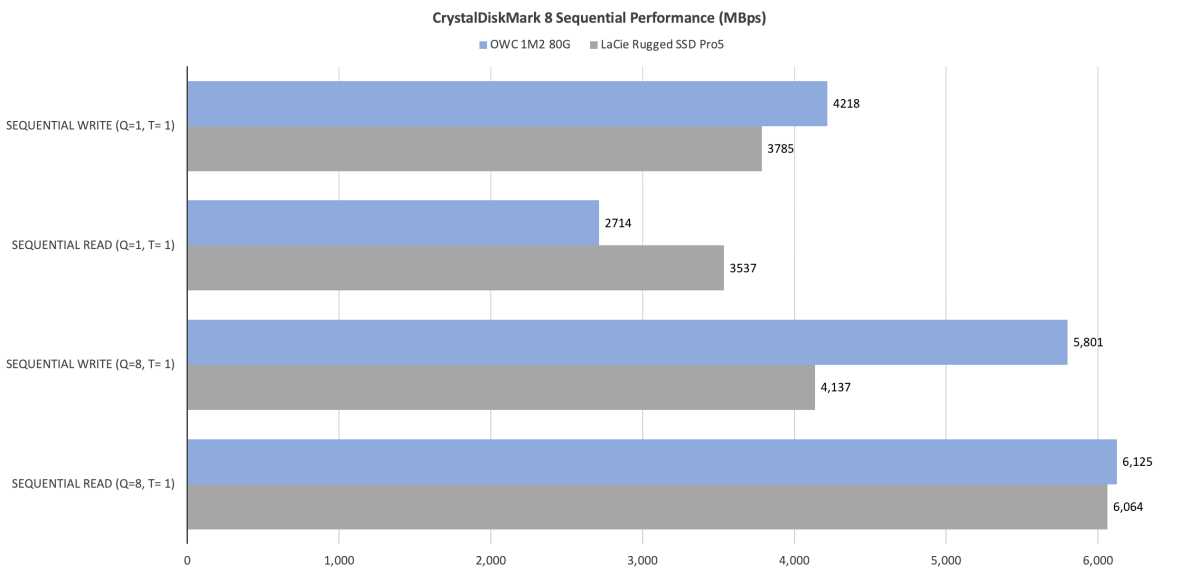
How fast is the OWC 1M2 80G? Short answer: very. In synthetic benchmarks, it was basically twice as fast as the older 1M2. Under sister publication PCWorld’s test protocol, it proved the fastest external SSD we’ve tested overall. Faster than LaCie’s Rugged SSD Pro5 to varying degrees.
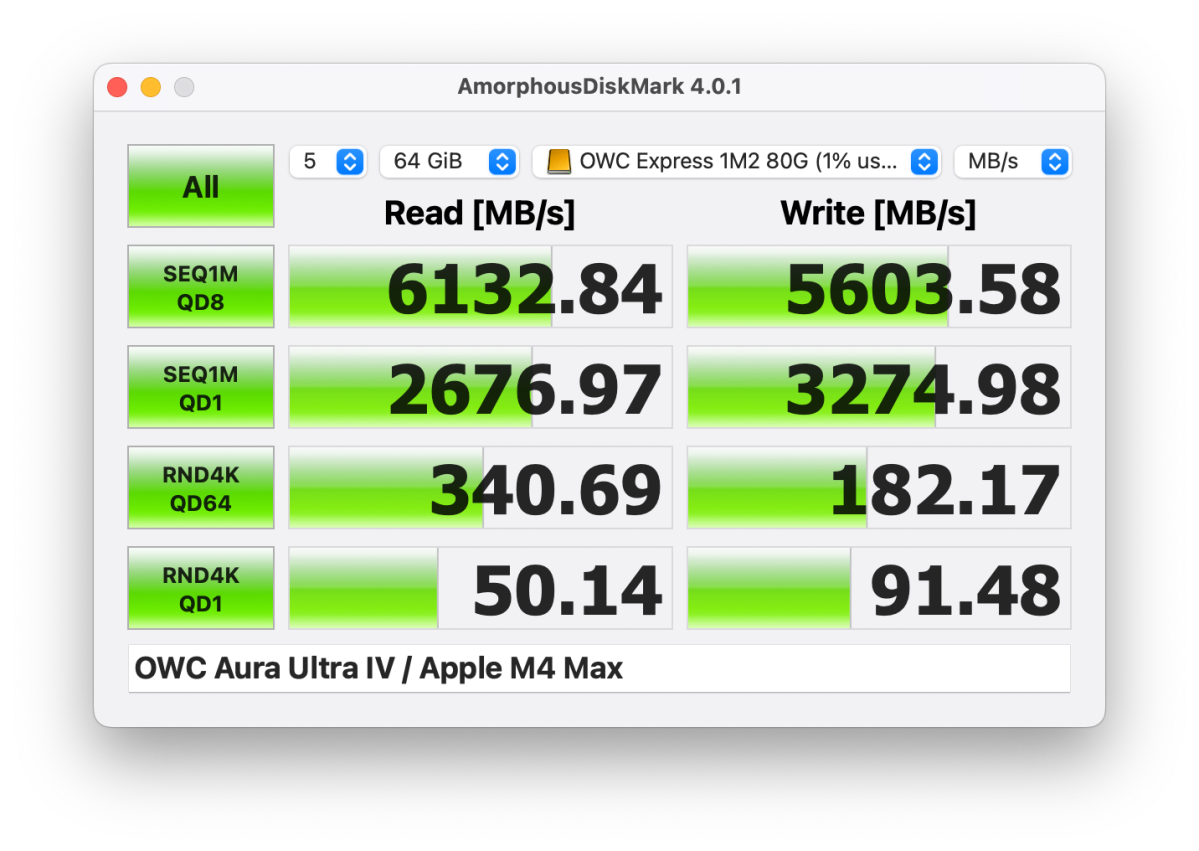
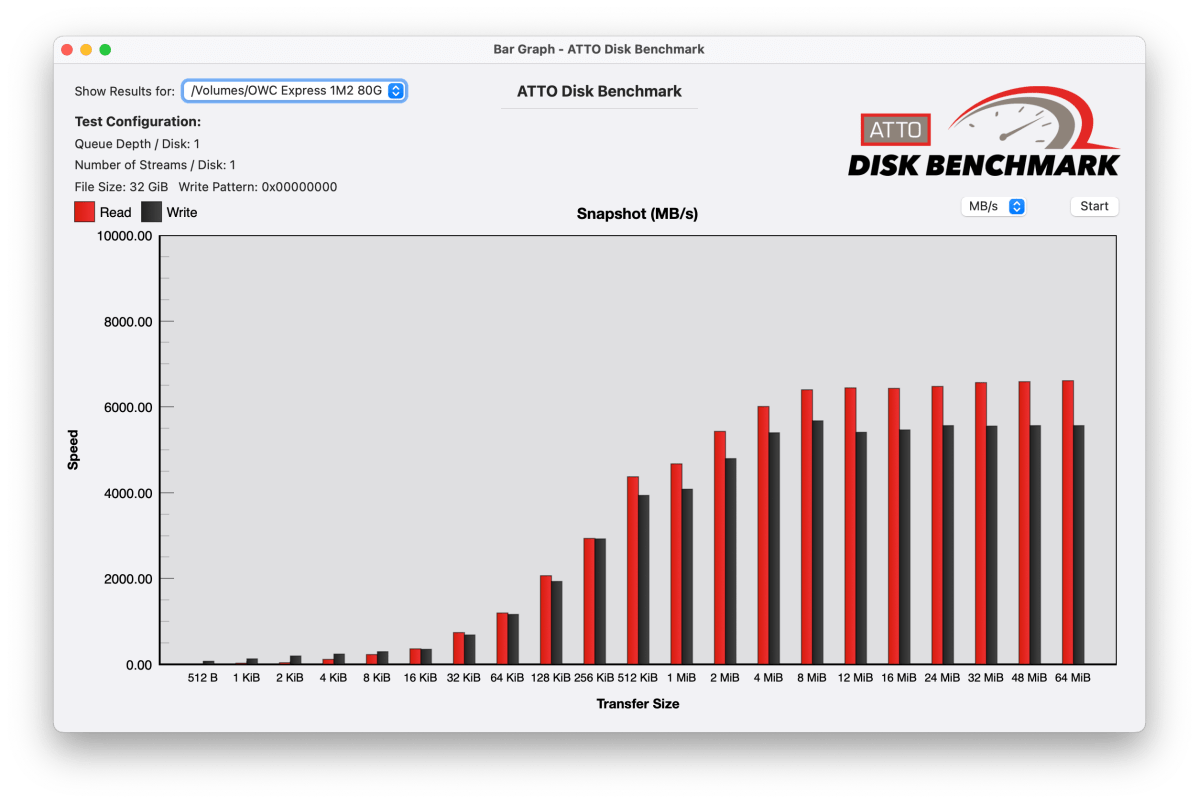
No matter which way you cut it, there are some pretty heady test numbers shown below, roughly 6GBps reading and 5.5GBps writing overall. It’s a bit of a shame that macOS can’t deliver the same performance with Finder transfers. At least not as of 15.6.1, which still seems to max out at around 3GBps. Come on, Apple, forget the AI and fix your Finder copy routines!
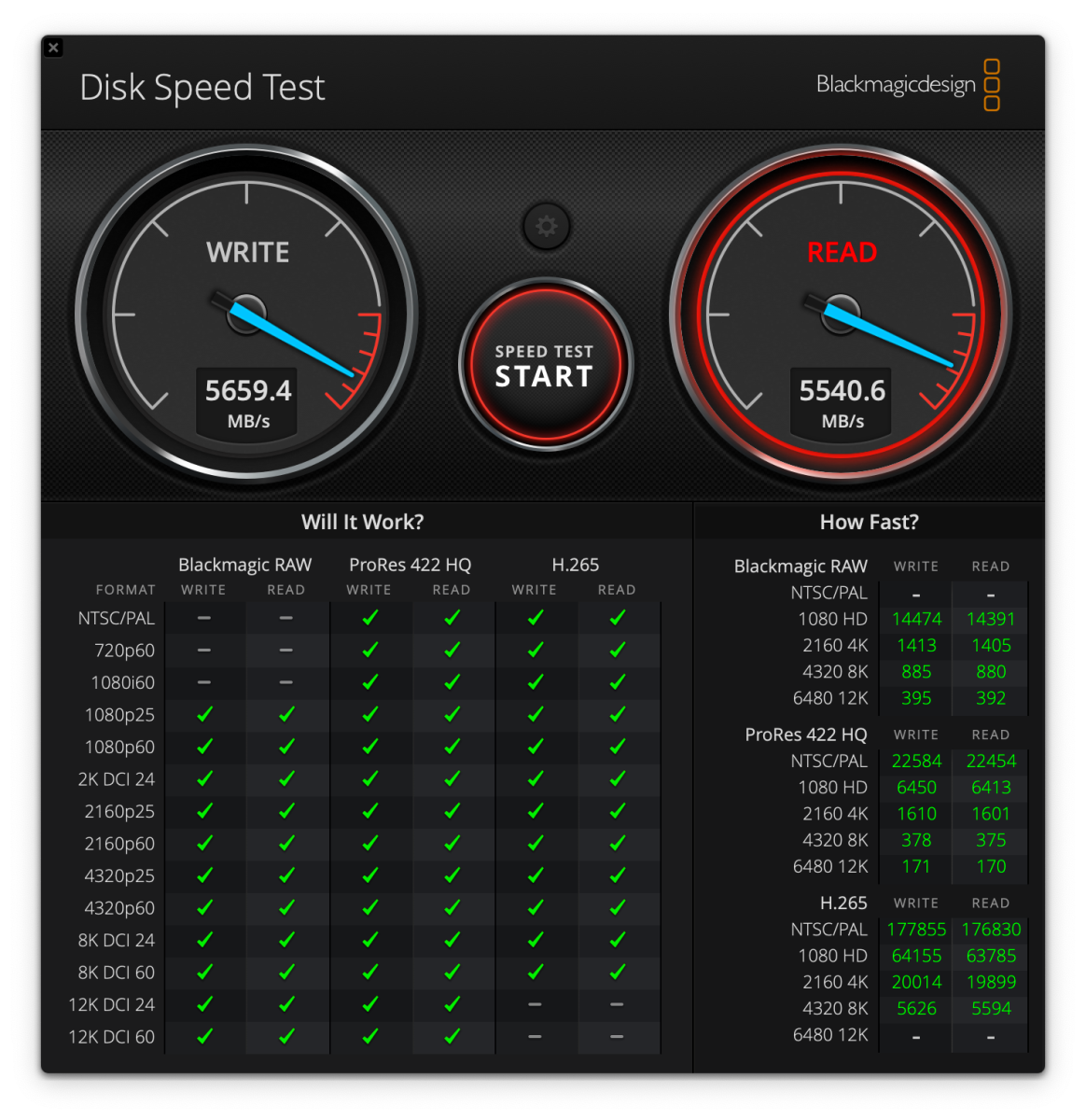
AmorphousDiskMark 4.01 thought more highly of the 1M2 80G than Disk Speed Test. Perhaps it has a better transfer engine.
ATTO basically agreed with Disk Speed Test and AmorphousDiskMark.
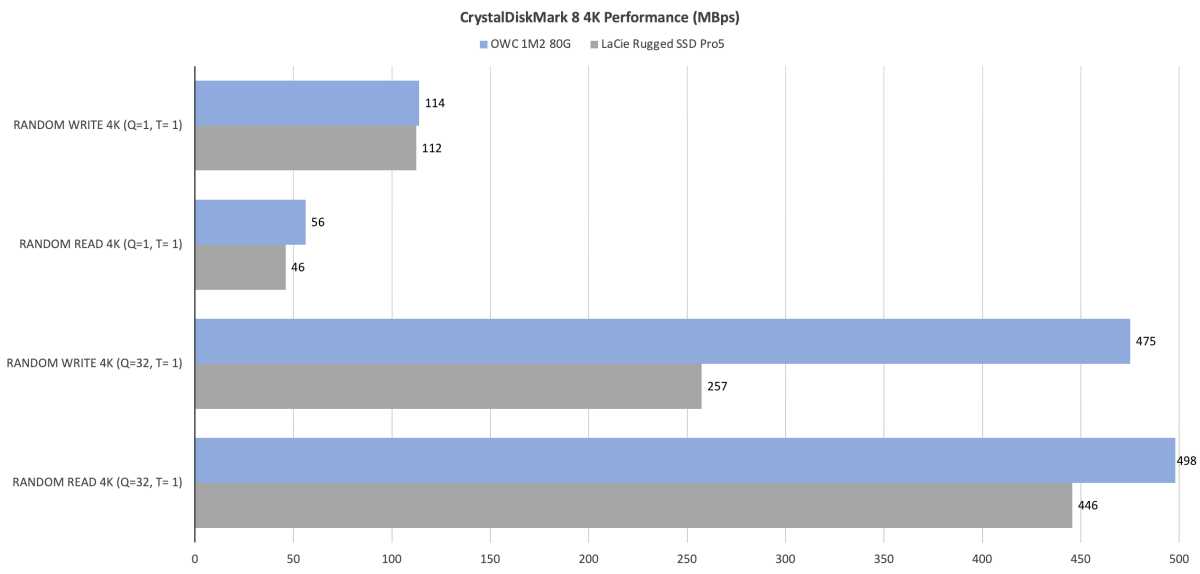
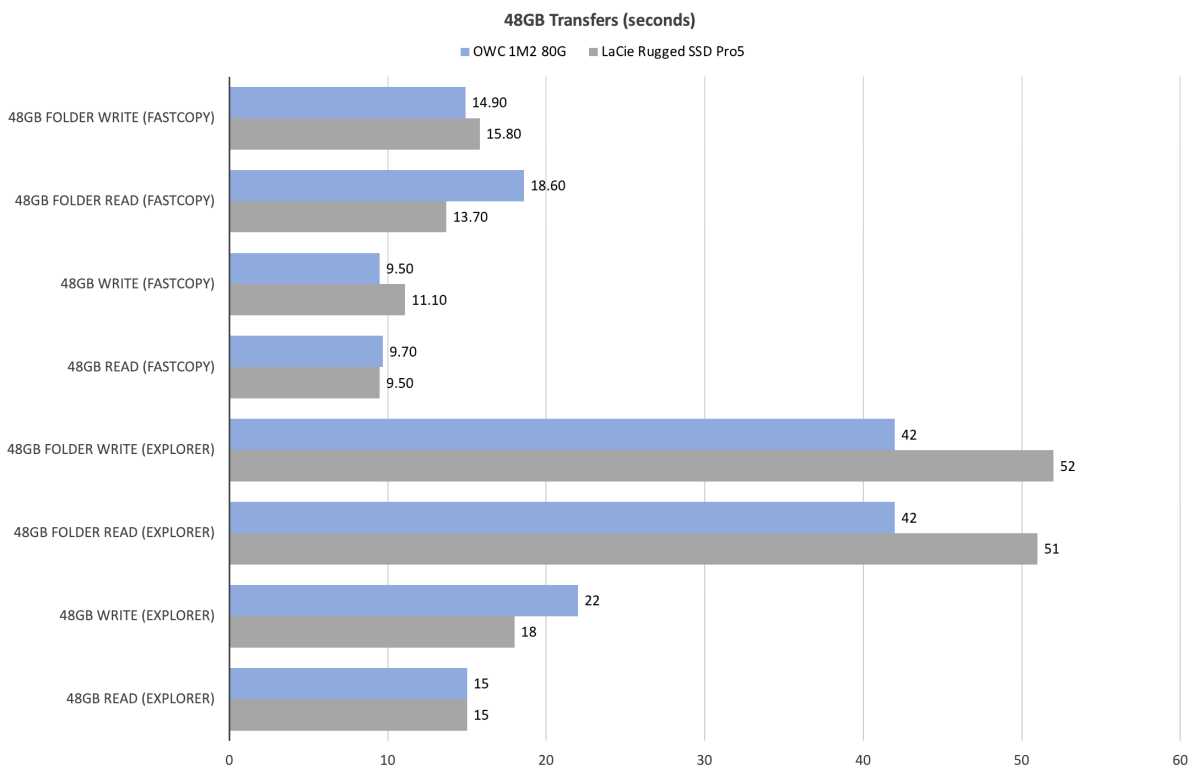
Here are the numbers that the 1M2 80G and the Rugged SSD Pro5 gathered on PCWorld’s testbed. They lean heavily in favor of the 1M2 80G for the most part.
There was a huge difference in random performance with queues in play, but not a lot of software uses those. Still, the 1M2 80G seems faster in this regard than the Rugged SSD Pro5.
The difference in real-world 48GB transfers was not particularly in the 1M2 80G’s favor. It was faster at some tasks than the Rugged SSD Pro5, and slower at others. Note that the Windows Explorer results are close to what you’ll see under Finder.
The 1M2 80G cleaned the Rugged SSD Pro5’s clock in our 450GB write test.
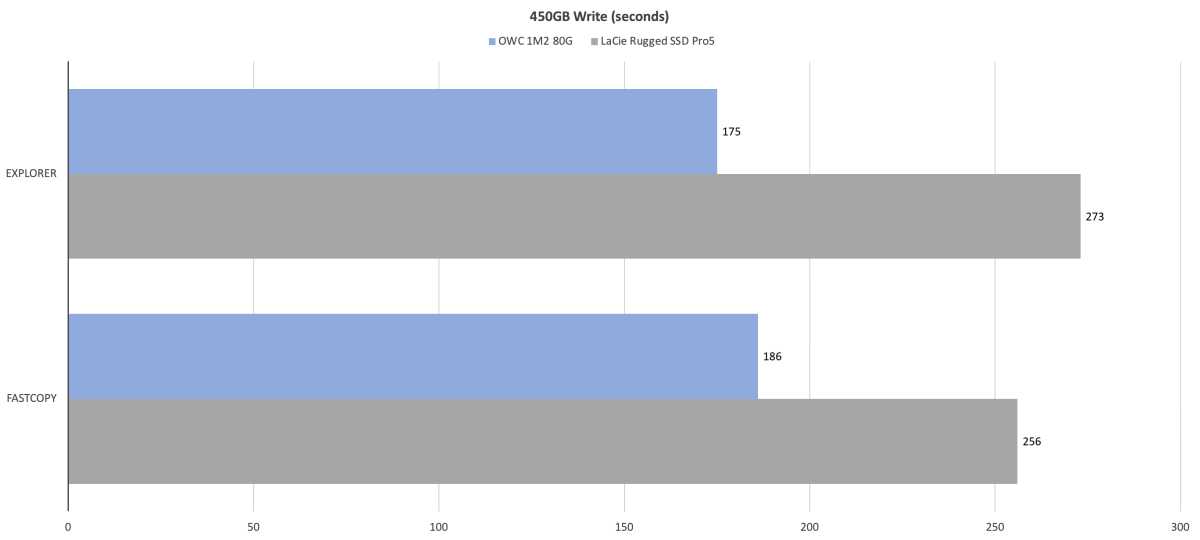
Note that FastCopy is a Windows file transfer utility that is far faster than Windows Explorer or macOS Finder, though the difference is far more apparent with internal NVMe SSDs than external drives, which are limited by bus speed.
There is a port of a very old version of FastCopy 2.1 called RapidCopy in the App store, but we can’t vouch that it’s as fast as FastCopy 5.1. It’s also $20, where the Windows version is free for personal use.
With the proper software, i.e., anything with optimized NVMe I/O, the 1M2 80G is a screamer.
Should you buy the OWC 1M2 80G?
If you want the fastest external storage on the planet, buy it–if your finances allow. On the other hand, 40Gbps SSDs or enclosures are considerably cheaper and still offer most of the real-world performance (at least in Finder) of 80Gbps. Regardless, the 1M2 80G is a very nice–if pricey–storage technology upgrade from OWC.
