


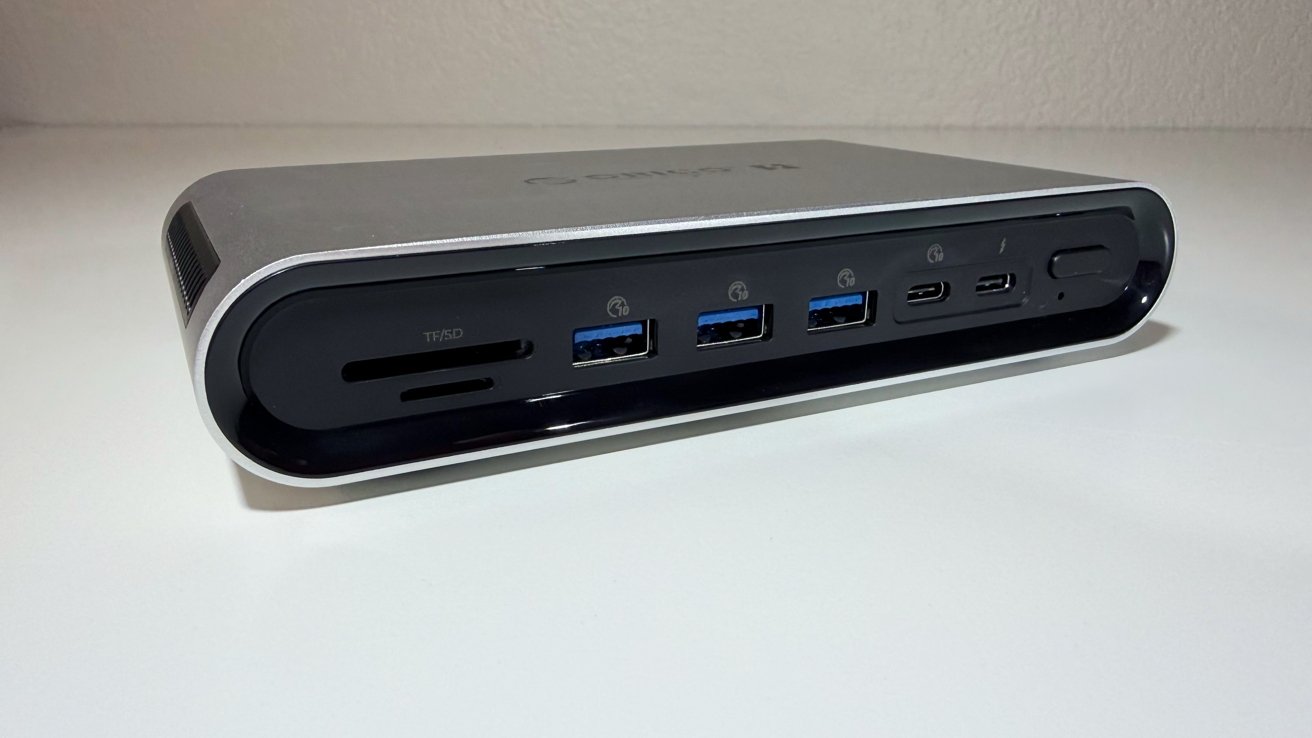
At about $330, the Orico Thunderbolt 5 Desktop Workstation adds fast storage, multiple display support, and 140W charging to your new Mac. It’s pretty nice, but not perfect.
It was Apple’s choice to switch to (almost) all USB-C in 2016. They really haven’t reversed course on this, other than conceding that MagSafe was pretty good, and so is native HDMI.
So, if you’re a regular AppleInsider reader, you know there’s a dock for everybody. Orico is relatively new to this game, but to date, what we’ve seen from them in the Thunderbolt 5 Dock is pretty solid, with a good price point to boot.
Orico Thunderbolt 5 Desktop Workstation review: Specifications
| Product | Orico Thunderbolt 5 Storage Docking Station (14-in-1) |
| Price | About $330 (Orico lists $329.99) |
| Model | ORICO-TB5 |
| Host connection | 1 x Thunderbolt 5 upstream, 80Gbps, 140W power delivery |
| Thunderbolt out | 2 x Thunderbolt 5 downstream (8K at 60Hz, daisy-chain to 6) |
| Built-in storage | M.2 NVMe 2280 slot, up to 8TB (drive not included) |
| Storage speed | Tested up to 6,000 MB/s (PCIe 5.0 support) |
| HDMI | 1 x HDMI, 8K at 30Hz alone, 4K at 60Hz shared |
| DisplayPort | 1 x DisplayPort, 8K at 30Hz alone, 4K at 60Hz shared |
| USB-A | 3 x USB-A 3.2, 10Gbps |
| USB-C | 1 x USB-C 3.2, 10Gbps |
| Ethernet | 2.5GbE (RJ45) |
| Card reader | SD 4.0 and TF 4.0 (simultaneous) |
| Audio | 3.5mm combo jack |
| Max displays | Up to 5 (subject to Mac limits) |
| Power adapter | 180W (20V/9A) |
| Material | Aluminum alloy and plastic |
| Weight | 0.85 pounds (384 grams) |
Orico Thunderbolt 5 Desktop Workstation review: Design
The dock uses an aluminum alloy body with plastic accents. It is compact and light at 0.85 pounds.
It is built to sit on a desk beside a Mac. The silver finish suits an Apple setup.
The M.2 slot sits inside the enclosure. A drive installs without extra cables.

Orico Thunderbolt 5 Desktop Workstation review: Front port view
The problem with all this is that it is very, very hot. While running with the SSD, the unit’s surface temperature hits about 111F. This is not enough to burn, but it’s also not comfortable to the touch.
We didn’t have any connectivity problems, but we’re concerned about long-term stability. This is an odd one where we get to keep the product after review instead of returning it to the vendor, so we’ll get back to you on this.
Orico Thunderbolt 5 Desktop Workstation review: Thunderbolt 5 and the Mac
One Thunderbolt 5 port connects to the host Mac. It runs at up to 80Gbps, delivering up to 140W of power to the host computer. In our testing that is enough to supply a 16-inch MacBook Pro under load, and supply a very small charge to the battery while getting hammered.
Two more Thunderbolt 5 ports face outward. They connect peripherals or daisy-chain up to six devices.
Older Macs still work, but slower. A Thunderbolt 4 or 3 Mac drops to its own ceiling, and monitor support will change based on the host, and the available bandwidth.
Speeds are about as you’d expect. We didn’t see any issues with external peripherals here. Power is sufficient for external drives, and so forth. It is not enough for Apple’s SuperDrive, through.
Orico Thunderbolt 5 Desktop Workstation: The built-in SSD slot
The dock’s standout feature is its internal drive bay. It takes one M.2 NVMe 2280 SSD, which is not provided.

Orico Thunderbolt 5 Desktop Workstation review: The M.2 compartment
Orico says the slot supports PCIe 5.0 drives. It measured speeds up to 6000 megabytes per second. We got about 5200 megabytes per second, which is close enough.
Real speed is gated by Thunderbolt bandwidth, not the drive. Even so, that is fast storage.
OOrico Thunderbolt 5 Desktop Workstation: Displays and the Apple caveat
The dock offers several ways to add displays. There is one HDMI port and one DisplayPort.
Each does 8K at 30Hz on its own. Together they drop to 4K at 60Hz.
The two Thunderbolt 5 outputs handle displays too. They reach 8K at 60Hz or 4K at 240Hz.
Orico lists support for up to five monitors. This is where Mac buyers must be careful.

Orico Thunderbolt 5 Desktop Workstation review: From above, with the power brick.
Apple Silicon limits how many external displays a Mac drives. Base chips support far fewer than Pro or Max chips.
For example, the M4 MacBook Air drives only two external displays. The five-display figure needs an M4 Max or better.
So check your Mac’s display limit before buying for multi-monitor use. This is not a DisplayLink driver dock, so you’re limited by the host.
Orico Thunderbolt 5 Desktop Workstation: The rest of the ports
The remaining ports cover everyday needs. There are three USB-A ports at 10Gbps. A single USB-C data port adds another 10Gbps connection. A 2.5GbE jack handles wired networking.
An SD 4.0 and TF 4.0 reader round things out. Both can be read at the same time, which is a nice touch.
A 3.5mm combo jack covers headsets. The bundled adapter supplies 180 watts.
They all work the way you think they will, even when slammed with I/O. The card readers top out at about 280 megabytes per second, each, which is about the same speed as Apple’s offering.
Orico Thunderbolt 5 Desktop Workstation: A storage dock for Thunderbolt 5 Macs
The concept behind the Orico Thunderbolt 5 Desktop Workstation is about as simple as it gets. It combines a Thunderbolt 5 hub with fast internal storage.
For a new Mac Studio or MacBook Pro and existing exorbitant SSD prices from Apple, that is useful. One cable adds ports, storage, and 140W charging. Done.
At about $330, it is priced well against big-name rivals. The internal and fast SSD slot is a standout.
Still, though, with that drive installed, I’m very concerned about the heat. Nothing I’ve ever tested has been this hot externally. More on that in a few months.
Orico Thunderbolt 5 dock Pros
- Built-in M.2 NVMe slot up to 8TB
- Thunderbolt 5 with 140W power delivery
- Strong port count for the price
Orico Thunderbolt 5 dock Cons
- Display limits depend on your Mac
- The hottest Thunderbolt dock we’ve ever tested
- Only one USB-C data port outside of Thunderbolt
Rating: 3.5 out of 5
I want to like the Orico Thunderbolt 5 dock more than I do. It’s a good dock, it has enough ports, it has enough speed, but that external casing is extremely hot.
As part of my longer-term assessment, beyond the month I’ve already used it, I’ll be keeping a close eye on that. If it remains stable, the score will go up. If it doesn’t, well…
Where to buy the Orico Thunderbolt 5 dock
The Orico Thunderbolt 5 Dock is available from Amazon at a base price of $399.99, with a 20% discount at checkout bringing it down to $319.99.
