


One of the strengths of local AI is its ability to filter out unwanted noise, and a couple of new Windows features Microsoft is testing take advantage of that. One of them will be rolled out to Copilot+ PCs that use Intel processors first, breaking Microsoft’s streak of tying new features to Windows on Qualcomm Snapdragon processors.
Microsoft’s Windows 11 Build 26120.5790 for the Beta Channel adds “fluid dictation” for Copilot+ PCs, which certainly perks up my ears as a journalist. The feature promises to correct grammar and punctuation, as well as to get rid of what’s known as “filler words:” the “you know,” “um,” and “well,” words that many people add as they internally parse their thoughts into a coherent sentence.
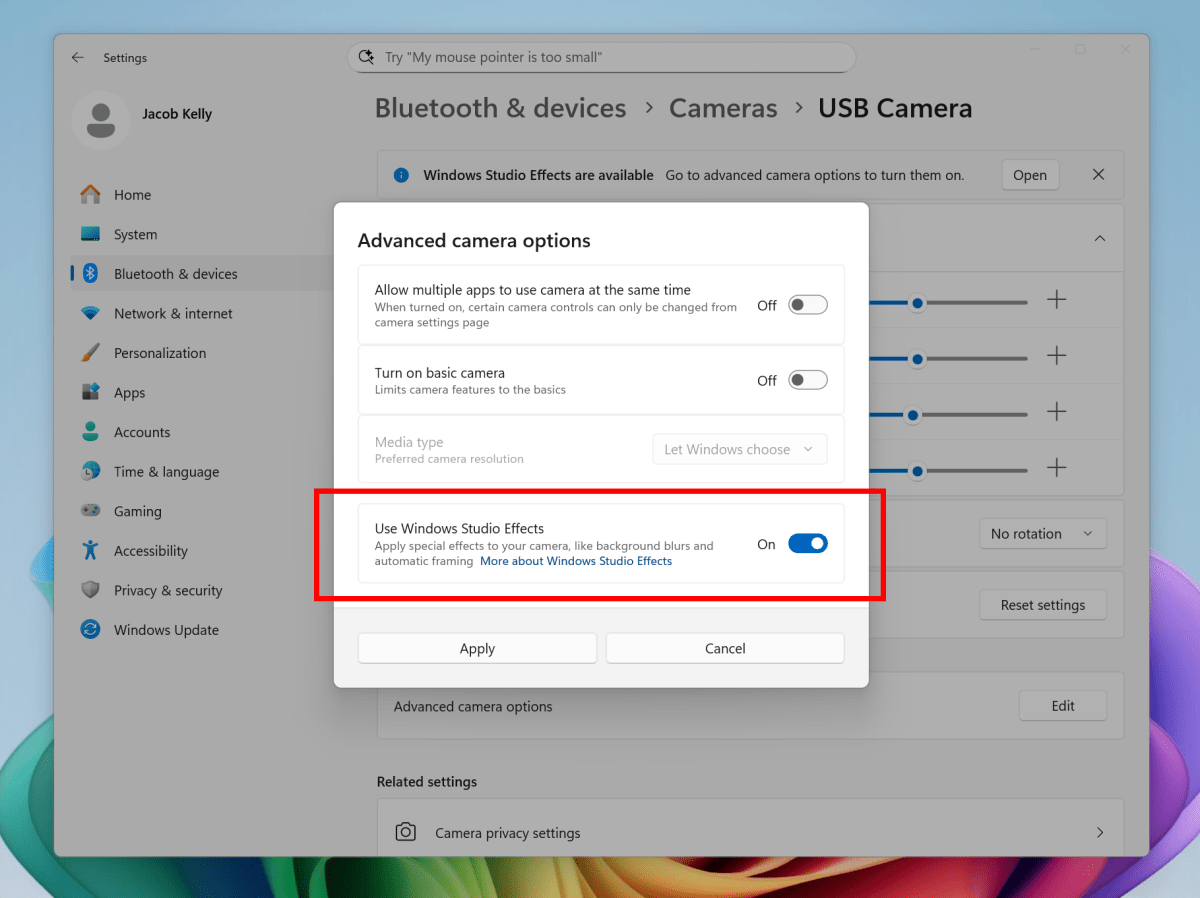
The other new feature is a key addition for webcams, as well. If you own a Copilot+ PC, you may have noticed Windows Studio Effects kick in while using the webcam: the webcam automatically crops in on your face, “zooming” to frame it in the picture. It can also blur the background and apply other effects. Use an external webcam, however, and those effects usually disappear. What Microsoft’s saying is that you’ll be able to apply Windows Studio Effects to external webcams, adding to their appeal.
“To get started, navigate to Settings > Bluetooth & devices > Cameras and select your preferred camera from the connected cameras list,” Microsoft says. “Then, open the advanced camera options menu to find the new “Use Windows Studio Effects” toggle.”
Microsoft
For Windows nerds, the interesting feature isn’t just the additional capabilities being added to your webcam. Microsoft typically rolls out new features on top of Windows on Snapdragon, the Qualcomm Arm processors, and has typically done so since the launch. Now, it’s rolling those out on Intel-powered Copilot+ PCs first, and on AMD and Snapdragon PCs “in a few weeks.” Does that mark a new trend? We’ll see.
Microsoft is also testing additional hover actions in File Explorer. Hovering over a file with your mouse in File Explorer Home will display commands like Open file location and Ask Copilot about this file, Microsoft says.
Microsoft is also releasing these new features in a new test build for Windows 11 25H2, though Microsoft indicated recently that 25H2 and 24H2 would share the same feature set.
