

Close Menu

    Subscribe to Updates

    Get the latest creative news from FooBar about art, design and business.

    What's Hot

    Access Denied

    Porsche shutters three units as new CEO makes first job cuts

    The new Wild West of AI kids’ toys

    Facebook X (Twitter) Instagram
    Facebook X (Twitter) Instagram Pinterest VKontakte
    Sg Latest NewsSg Latest News
    • Home
    • Politics
    • Business
    • Technology
    • Entertainment
    • Health
    • Sports
    Sg Latest NewsSg Latest News
    Home»Technology»Make Chrome safer against scam sites by flipping on this AI feature
    Technology

    Make Chrome safer against scam sites by flipping on this AI feature

    AdminBy AdminNo Comments2 Mins Read
    Facebook Twitter Pinterest LinkedIn Tumblr Email
    Share
    Facebook Twitter LinkedIn Pinterest Email


    Google’s Chrome browser has a feature called Enhanced Safe Browsing that uses real-time AI-powered techniques to protect users against online threats. Unlike the more basic Safe Browsing feature, which compares visited addresses against a database of known dangerous sites, Enhanced Safe Browsing uses AI to recognize yet-unknown threats.

    Google hasn’t published exact details on how Enhanced Safe Browsing works, only vague explanations like “in-depth scans for suspicious downloads” and “improves security for you and everyone on the web.”

    Furthermore, Enhanced Safe Browsing is less private than standard Safe Browsing. Enhanced Safe Browsing “sends the URLs of sites you visit and a small sample of page content, downloads, extension activity, and system information to Google Safe Browsing to check if they’re harmful” and “this data is linked to your Google Account to protect you across Google services, for example increasing protection in Gmail…”
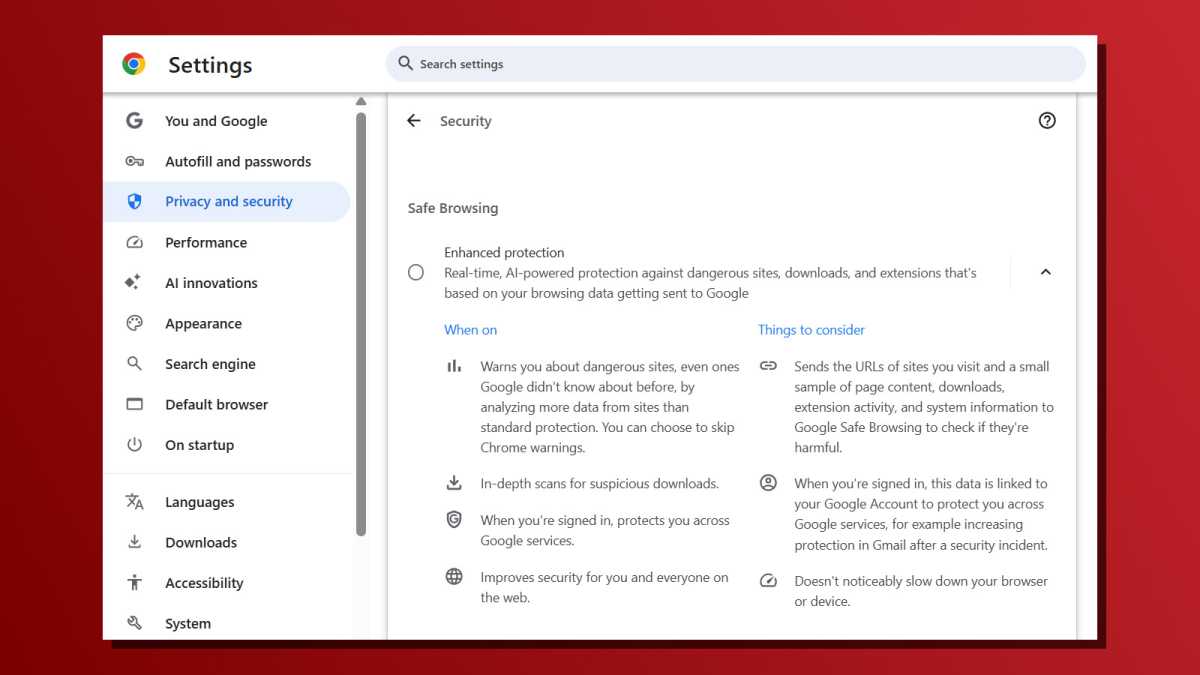
    Chrome browser security settings for Enhanced Safe Browsing
    Google Chrome has a new AI-powered feature called Enhanced Safe Browsing that’s designed to protect users against dangerous sites and downloads.

    Joel Lee / Foundry

    Still, if you want real-time protection against zero-day threats like malware and fraudulent sites, you’ll be better protected with Enhanced Safe Browsing enabled. But Enhanced Safe Browsing isn’t enabled by default, so you’ll have to enable it manually if you want it.

    To do this, click on the three-dot menu at the top-right of the browser, then navigate to Settings > Privacy and security > Safe Browsing and select “Enhanced protection.” Use the arrow button on the right side to open up explanations for each setting level.

    Further reading: Must-known tips to make Chrome more secure

    This article originally appeared on our sister publication PC-WELT and was translated and localized from German.

    Share. Facebook Twitter Pinterest LinkedIn Tumblr Email
    Admin
    • Website

    Related Posts

    The new Wild West of AI kids’ toys

    Denon Home series speakers review: Siri & superior sound

    Google settles racial discrimination lawsuit for $50 million

    Access Denied

    Add A Comment
    Leave A Reply Cancel Reply

    Editors Picks

    Electrical fire to keep theater that hosts ‘The Book of Mormon’ closed through May 17

    The 2026 Grammy Award nominations are about be announced. Here’s what to know

    Disease of 1,000 faces shows how science is tackling immunity’s dark side

    Judge reverses Trump administration’s cuts of billions of dollars to Harvard University

    Top Reviews
    9.1

    Review: Mi 10 Mobile with Qualcomm Snapdragon 870 Mobile Platform

    By Admin
    8.9

    Comparison of Mobile Phone Providers: 4G Connectivity & Speed

    By Admin
    8.9

    Which LED Lights for Nail Salon Safe? Comparison of Major Brands

    By Admin
    Sg Latest News
    Facebook X (Twitter) Instagram Pinterest Vimeo YouTube
    • Get In Touch
    © 2026 SglatestNews. All rights reserved.

    Type above and press Enter to search. Press Esc to cancel.