



Here’s how to downgrade iOS 26 to iOS 18.6.2 or iOS 18.7 on your compatible iPhone or iPad device.
Whenever Apple announces a big new iPhone or iPad software update, it can be tempting to jump on board and install it early. But that can often lead to problems with the software, sometimes full of bugs and other issues. If you do update to the new iOS 26 or iPadOS 26 releases and find that you need to downgrade again, here’s what you need to do.

All of these steps require that you have a Windows PC or a Mac to get the ball rolling, and you’ll also need to have hold of the version of iOS and iPadOS that you want to download.
Step 1: Ensure that you have upgraded to, and are running, the latest version of iTunes on your PC or Mac. If you are running macOS Catalina or later, then you don’t need to worry about iTunes, because this is all handled by the Finder app built directly into the OS.
Step 2: You will need to be in possession of the correct IPSW iOS/iPadOS 18.6.2 file that has been compiled by Apple and that is intended for your device. We will be downgrading your device using this file, and can grab file for your relevant device from here.
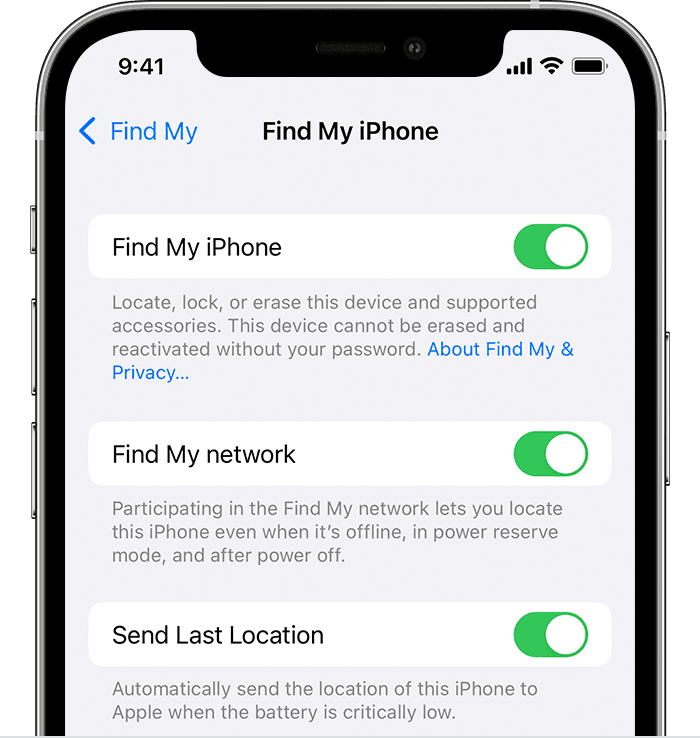
Step 3: Now, you will need to make sure that the Find My feature is disabled on your iPhone or iPad. In order to do that, launch Settings > iCloud > Find My and toggle the switch to the Off position. Input the Apple ID and correct password to confirm your decision.
Step 4: Connect your device to your PC or Mac. If iTunes doesn’t load automatically, you’ll need to do it manually and make sure that it’s running. If you’re running macOS Catalina or later, launch a Finder window.
Next, put your device into DFU mode using the quick guides below (if you don’t already know how to do it):
iPhone XR / XS / XS Max / 11 / 11 Pro / 11 Pro Max / 12 / 12 mini / 12 Pro / 12 Pro Max / 13 / 13 mini / 13 Pro / 13 Pro Max / 14 / 14 Plus / 14 Pro / 14 Pro Max /15 / 15 Plus / 15 Pro / 15 Pro Max/16 / 16 Plus / 16 Pro / 16 Pro Max, or 2018+ iPad Pro owners can follow this guide.
Step 5: With the DFU mode step out of the way, head into iTunes or Finder and press and hold the Option key on a Mac or the Shift key on a PC, and click the Restore iPhone/iPad option.
Step 6: Choose the IPSW file (iOS/iPadOS) that you downloaded earlier in the process. Exercise some patience and allow iTunes/Finder to go through the standard process and leave you with an iPhone or iPad that has been downgraded from iOS/iPadOS 26 to the version included within the IPSW file that you’ve chosen.
You may also like to check out:
You can follow us on X, or Instagram, subscribe to our YouTube channel and even like our Facebook page to keep yourself updated on all the latest from Microsoft, Google, Apple, and the Web.
