

Close Menu

    Subscribe to Updates

    Get the latest creative news from FooBar about art, design and business.

    What's Hot

    Why Democrats Think They Can Flip Texas

    The legacy of Jerome Powell at the Fed

    State of the Platform Economy 2026

    Facebook X (Twitter) Instagram
    Facebook X (Twitter) Instagram Pinterest VKontakte
    Sg Latest NewsSg Latest News
    • Home
    • Politics
    • Business
    • Technology
    • Entertainment
    • Health
    • Sports
    Sg Latest NewsSg Latest News
    Home»Technology»Forgot a file at home? This free Google tool can save the day
    Technology

    Forgot a file at home? This free Google tool can save the day

    AdminBy AdminNo Comments2 Mins Read
    Facebook Twitter Pinterest LinkedIn Tumblr Email
    Share
    Facebook Twitter LinkedIn Pinterest Email


    A remote desktop lets you control another computer over the internet as if you were sitting right in front of it. You can open files, run programs, and use it just like your own PC, even from hundreds of miles away. You might not need this kind of access all the time, but when you do, a good remote desktop app can be incredibly useful. One of the simplest ways to connect to a Windows machine is through Chrome Remote Desktop.

    This free tool from Google lets you remotely access your computer from pretty much anywhere—your laptop, phone, tablet, you name it. It’s also surprisingly simple to set up. You install a small extension, sign in with your Google account, and you’re basically good to go. There’s no need for complicated networking knowledge or a PhD in Computer Science to use it.
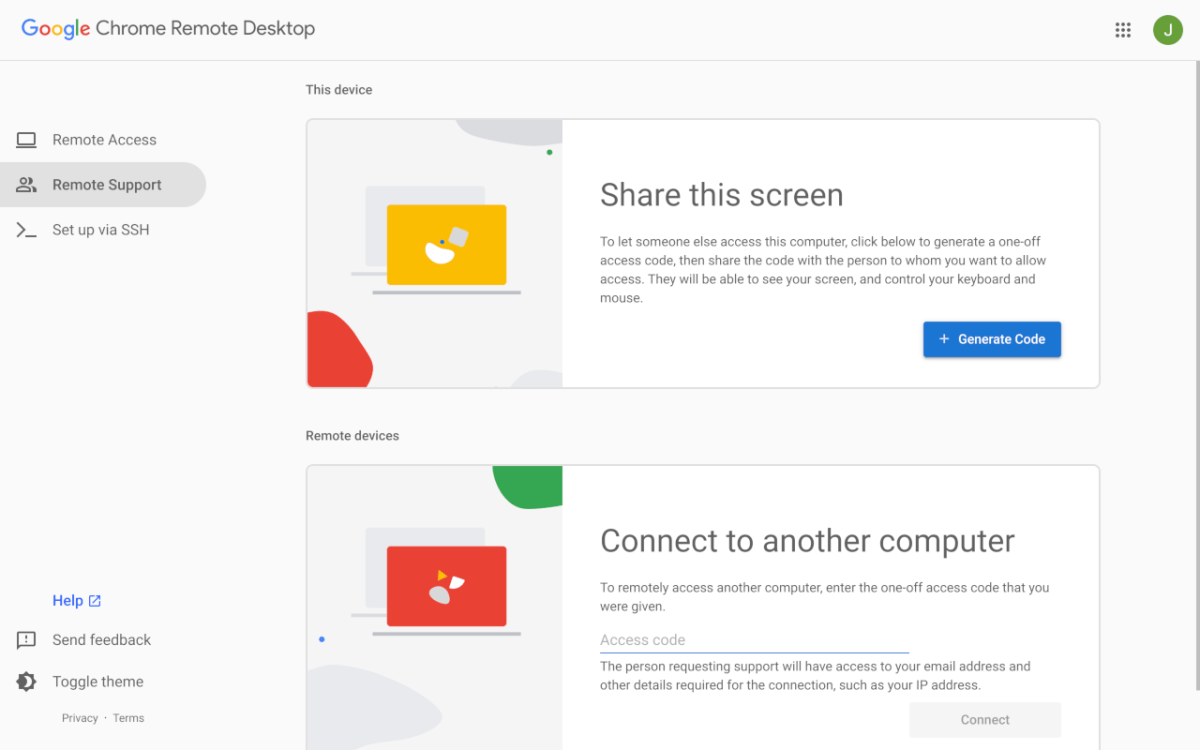
    Connecting to a remote desktop is super easy thanks to Chrome Remote Desktop.

    Once you’re connected, you can open files, run programs, or troubleshoot issues in real time on the remote PC. It’s especially handy if you forget an important file at home or need to quickly jump into your desktop while traveling. I use it all the time to help my less tech-savvy friends and family without having to physically be there—this way I can get everything fixed before I visit for the holidays.

    Chrome Remote Desktop isn’t trying to be some ultra-advanced enterprise tool. Compared to paid options, it’s a bit lighter on features—no built-in chat or fancy multi-user controls—but you don’t need those for simple tasks anyway. It focuses on doing the basics really well, providing fast, reliable remote access without much hassle.

    If you live in the Chrome ecosystem like me, or you just need a simple way to access desktops remotely, this should be your go-to. Give Chrome Remote Desktop a try next time you’re traveling or a faraway friend is in need of your elite tech skills.

    For more fun and helpful website and app recommendations, be sure to subscribe to our PCWorld Try This newsletter.

    Share. Facebook Twitter Pinterest LinkedIn Tumblr Email
    Admin
    • Website

    Related Posts

    State of the Platform Economy 2026

    The World’s Fifth‑Largest Capital Market Powering A Full‑Stack AI Ecosystem

    GameChange Solar Announces Compatibility Between Genius Tracker™ And SUNPURE’s Saturn Module Installation System

    How the Library of Congress is using both AI and volunteers to unlock public broadcasting history

    Add A Comment
    Leave A Reply Cancel Reply

    Editors Picks

    Electrical fire to keep theater that hosts ‘The Book of Mormon’ closed through May 17

    The 2026 Grammy Award nominations are about be announced. Here’s what to know

    Disease of 1,000 faces shows how science is tackling immunity’s dark side

    Judge reverses Trump administration’s cuts of billions of dollars to Harvard University

    Top Reviews
    9.1

    Review: Mi 10 Mobile with Qualcomm Snapdragon 870 Mobile Platform

    By Admin
    8.9

    Comparison of Mobile Phone Providers: 4G Connectivity & Speed

    By Admin
    8.9

    Which LED Lights for Nail Salon Safe? Comparison of Major Brands

    By Admin
    Sg Latest News
    Facebook X (Twitter) Instagram Pinterest Vimeo YouTube
    • Get In Touch
    © 2026 SglatestNews. All rights reserved.

    Type above and press Enter to search. Press Esc to cancel.