

Close Menu

    Subscribe to Updates

    Get the latest creative news from FooBar about art, design and business.

    What's Hot

    Turn off ads across your family’s devices with one $11 purchase

    Maine Democrats meet to select Senate nominee to replace Graham Platner

    NAVER Partners With Brookfield And NVIDIA To Expand Korea’s National AI Factory Infrastructure Buildout

    Facebook X (Twitter) Instagram
    Facebook X (Twitter) Instagram Pinterest VKontakte
    Sg Latest NewsSg Latest News
    • Home
    • Politics
    • Business
    • Technology
    • Entertainment
    • Health
    • Sports
    Sg Latest NewsSg Latest News
    Home»Technology»Facebook Verified is here to confirm whether your friend is AI
    Technology

    Facebook Verified is here to confirm whether your friend is AI

    AdminBy AdminNo Comments2 Mins Read
    Facebook Twitter Pinterest LinkedIn Tumblr Email
    Share
    Facebook Twitter LinkedIn Pinterest Email


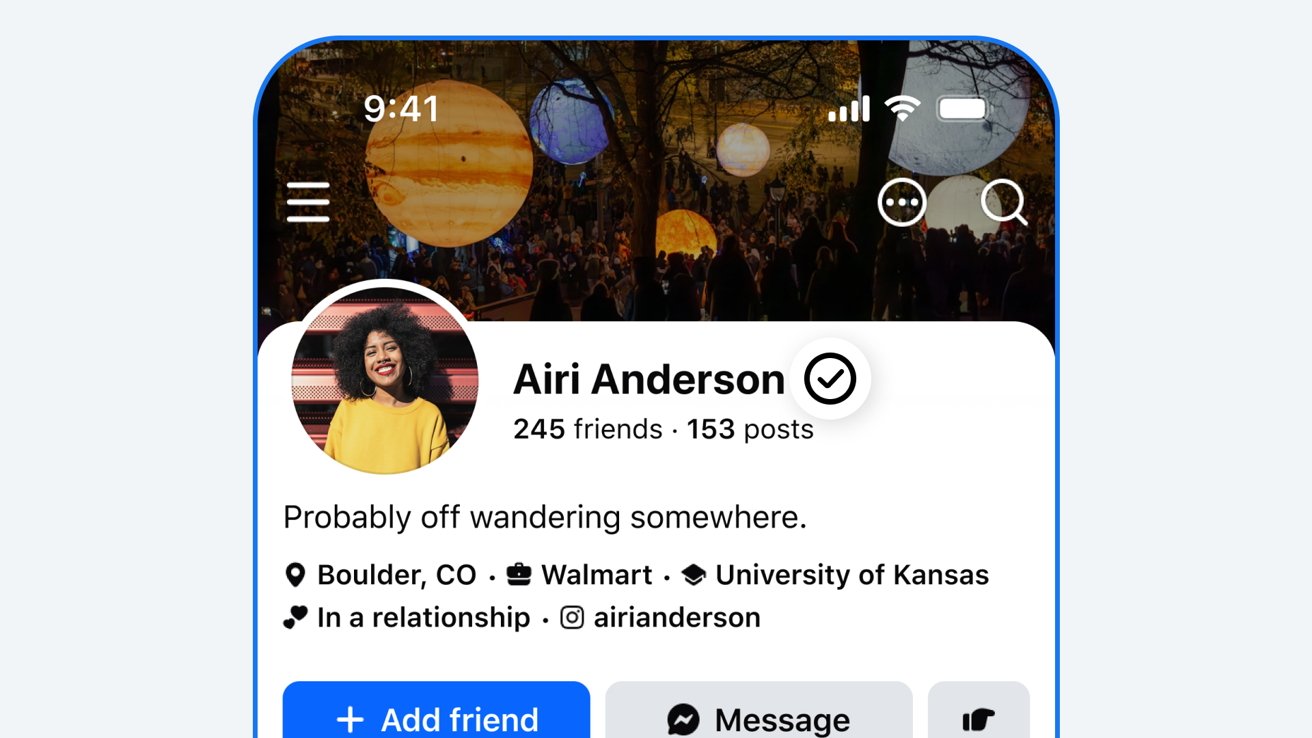
    Meta has announced Facebook Verified, a free badge that will be visible on a user’s profile and is designed to confirm whether that user is a real person or an AI without actually checking that a user is who they say they are.

    The new badge is separate from Meta’s existing Meta Verified program and is available to eligible Facebook users who are 18 or older. Users must also be in good standing with Facebook’s community standards before they can be verified.

    Alongside profiles, Facebook users will also be able to see a person’s verified status in the Marketplace, Facebook Dating, and Facebook Groups initially. However, Meta has confirmed that it intends to bring the badges to the main feed in the future.

    Free, basic verification

    Importantly, unlike Meta Verified, Facebook Verified doesn’t require a subscription and is available absolutely free. Users only need to complete the verification process once.

    The verification process itself requires Facebook users to record a short selfie video. Facebook then uses the video to check the person’s appearance against their existing profile photos to confirm a match. The process should take just a few minutes.

    However, it’s important to know what Facebook Verified actually verifies. Meta says that it means a profile belongs to a real person, not an AI.

    Facebook Verified does not necessarily mean that the person is who they say they are. That’s an important distinction to remember when using Facebook from here on out.

    Meta says that Facebook Verified will roll out in phases, starting with “select markets.” Unfortunately, it hasn’t confirmed which markets those are.

    Share. Facebook Twitter Pinterest LinkedIn Tumblr Email
    Admin
    • Website

    Related Posts

    Turn off ads across your family’s devices with one $11 purchase

    NAVER Partners With Brookfield And NVIDIA To Expand Korea’s National AI Factory Infrastructure Buildout

    Trip.com Group Sincerely Accepts Administrative Penalty Decision Issued by the State Administration for Market Regulation of the People’s Republic of China

    Navigating the UK Intellectual Property Office: Tips for Successful Trademark Registration – Latest Technology News – Gaming & PC Tech Magazine

    Add A Comment
    Leave A Reply Cancel Reply

    Editors Picks

    Most Impressive Team Streaks Of The 21st Century: Where Does 2024-26 Spain Rank?

    NBC’s ‘Stumble’ is a mockumentary about a cheer team with plenty of tumbling runs and heart

    Xiaomi shares post worst week in 3½ years as accidents stoke EV safety concerns

    Judge reverses Trump administration’s cuts of billions of dollars to Harvard University

    Top Reviews
    9.1

    Review: Mi 10 Mobile with Qualcomm Snapdragon 870 Mobile Platform

    By Admin
    8.9

    Comparison of Mobile Phone Providers: 4G Connectivity & Speed

    By Admin
    8.9

    Which LED Lights for Nail Salon Safe? Comparison of Major Brands

    By Admin
    Sg Latest News
    Facebook X (Twitter) Instagram Pinterest Vimeo YouTube
    • Get In Touch
    © 2026 SglatestNews. All rights reserved.

    Type above and press Enter to search. Press Esc to cancel.