


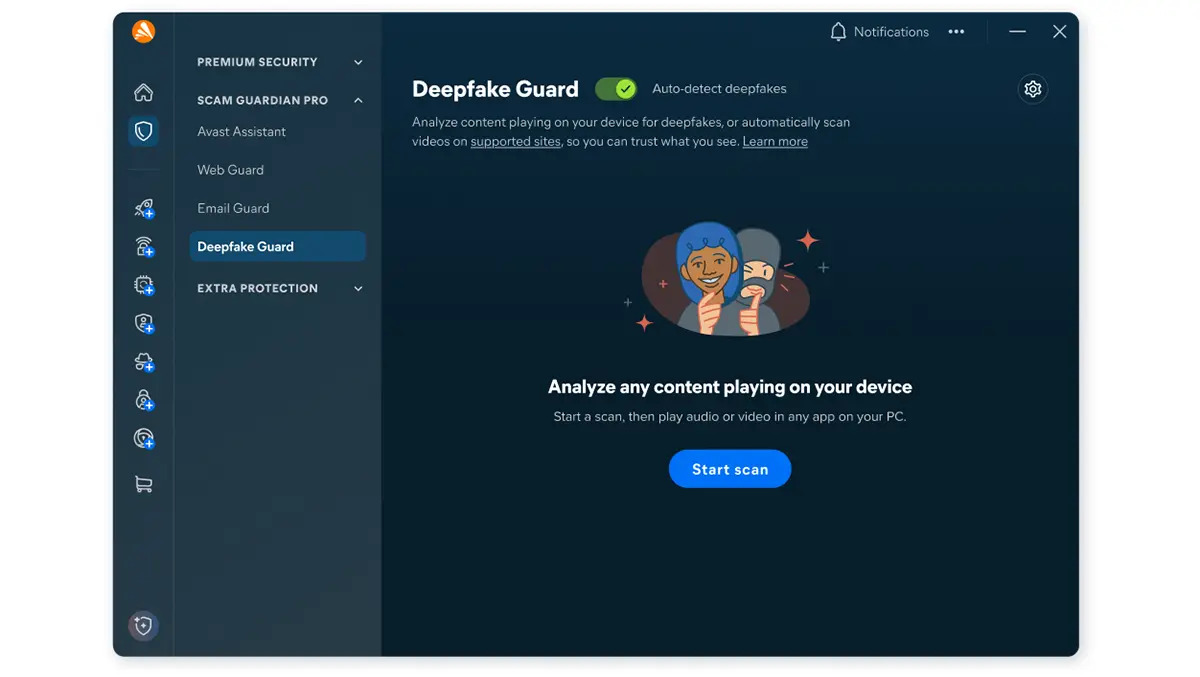
Avast has expanded its Scam Guardian tools globally on mobile while introducing Deepfake Guard for Windows PCs. The two features sit within Avast’s broader security suite and aim to tackle modern social engineering tactics across calls, messages and video.
Scam Guardian is available on Android and iOS through Avast’s mobile security apps. Deepfake Guard runs on Windows PCs and is included with Avast Premium Security. The idea is simple: protect users wherever scams now appear, whether that is a text message, a voice call or a YouTube video.
Deepfake Guard supports major video platforms including YouTube, Facebook, Instagram, TikTok, Twitch and Vimeo. Video analysis is currently limited to English.
Setup process
Installation is straightforward. After activating the subscription through an Avast account, Deepfake Guard appears within the desktop security dashboard. On compatible systems it can be enabled in a few clicks.
Hardware requirements vary. On newer AI-focused PCs with Intel Core Ultra or Qualcomm Snapdragon X chips, automated detection runs by default. On high-end traditional PCs running Windows 11 with at least 16GB of RAM and six CPU cores, automated detection can be enabled manually. Lower-spec systems need at least 8GB of RAM and four CPU cores, though Avast recommends manual scanning rather than constant monitoring to avoid performance strain.
During testing on a mid-range Windows 11 laptop with 16GB of RAM, installation took only a few minutes. The feature integrated cleanly with the existing antivirus interface.
Deepfake detection
Deepfake Guard analyses audio within videos in real time. It focuses on identifying manipulated voices that are combined with known scam patterns. Processing is done on-device rather than in the cloud.
In practice, that means the software monitors audio while a video plays in a browser. If it detects signs of AI-generated manipulation associated with scam tactics, it triggers a warning.
During hands-on use, alerts appeared as desktop notifications. The warning did not block playback but advised caution and explained that the audio might be artificially generated or linked to fraudulent behaviour. The alert text was clear and avoided technical jargon.
Testing involved a mix of legitimate tech reviews, financial commentary and known scam-style videos that use cloned celebrity voices to promote fake investment schemes. Deepfake Guard did not flag standard content. It did flag several obviously manipulated promotional videos that used synthetic speech patterns and urgent calls to action.
False positives were limited in our time with the software, though long-term use will be a better test. Users who consume parody or satire content may occasionally see alerts where voices are intentionally altered.
Performance impact
Running constant audio analysis raises questions about system load. On a compatible high-end PC, CPU usage increased slightly during video playback but remained within acceptable limits. Fans did not ramp up noticeably and battery drain was moderate.
Avast allows automated detection to be disabled if performance becomes an issue. On lower-spec machines, manual detection is recommended instead of continuous scanning. That adds an extra step but may be necessary on older hardware.
The choice to process everything locally improves privacy. No video or audio content is uploaded externally for analysis, according to Avast. For users wary of cloud-based scanning, that will be welcome.
Mobile protection
Scam Guardian on mobile takes a broader approach. It analyses calls, SMS messages and emails for common scam indicators. The Pro tier adds enhanced filtering and blocking tools.
In testing on Android, Scam Guardian flagged suspicious text messages that used typical phishing language, such as requests for urgent account verification. Alerts appeared quickly and offered guidance on why the message was risky.
Call screening worked similarly. When a suspected scam number rang, the app displayed a warning before the call was answered. Legitimate numbers from contacts were not affected.
The interface is clean and easy to navigate. Risk explanations are short and written in plain English. The feature avoids overwhelming users with technical detail.
Real-world context
Scams increasingly rely on video platforms. Fraudsters embed fake endorsements, manipulated tutorials and cloned voices within ordinary browsing. These videos often appear as part of normal feeds rather than as suspicious downloads.
By focusing on audio manipulation and scam intent together, Deepfake Guard attempts to address the overlap between synthetic media and classic fraud techniques. It does not attempt to identify every instance of AI-generated content. The emphasis is on deception, not on the mere presence of AI.
This distinction matters. Many creators use AI tools legitimately. Flagging all AI-generated media would create too many false alarms. Avast instead looks for combinations of suspicious voice characteristics and behavioural red flags.
Ease of use
Both features are designed to require minimal intervention. Once enabled, Deepfake Guard runs in the background. Scam Guardian integrates into the mobile notification system.
Advanced settings are limited. Users can toggle detection modes and review recent alerts, but there is little scope for fine-tuning detection thresholds. That simplicity will suit most people, though power users may want more granular controls.
Alerts are informative without being alarmist. They encourage users to verify claims independently rather than automatically blocking content. This approach reduces frustration and supports informed decision-making.
Limitations
Deepfake Guard currently supports English-language audio only. Multilingual households will need broader support before relying on it fully.
Compatibility restrictions may also limit uptake. Older Windows PCs with minimal hardware may struggle to run automated detection smoothly.
No software can guarantee complete protection against scams. Determined fraudsters adapt quickly. Deepfake Guard and Scam Guardian should be viewed as additional layers rather than standalone solutions.
Final thoughts
Avast Deepfake Guard and Scam Guardian reflect how scam tactics are evolving. Video and synthetic audio are now common tools in fraud campaigns. Traditional antivirus signatures are not enough to counter that shift.
In hands-on use, both features proved practical and unobtrusive. Detection was timely and reasonably accurate. Performance impact was present but manageable on suitable hardware.
For Windows users already subscribed to Avast Premium Security, Deepfake Guard adds a relevant layer of defence with little effort required. Mobile users gain broader protection against calls and messages through Scam Guardian.
The effectiveness of these tools will depend on continued updates as scam techniques change. For now, they represent a measured and technically thoughtful response to the rise of AI-driven deception.
