

Close Menu

    Subscribe to Updates

    Get the latest creative news from FooBar about art, design and business.

    What's Hot

    Lenovo Surges In Global Coverage

    Spain’s La Mercè Barcelona Festival, Autumn’s Greatest Cultural Celebration

    Big Bets Report: Koivun’s First Title Equals $4 Million Win For Bettor

    Facebook X (Twitter) Instagram
    Facebook X (Twitter) Instagram Pinterest VKontakte
    Sg Latest NewsSg Latest News
    • Home
    • Politics
    • Business
    • Technology
    • Entertainment
    • Health
    • Sports
    Sg Latest NewsSg Latest News
    Home»Technology»Apple Music finally gets a swipe gesture to change tracks and I’ve never been happier
    Technology

    Apple Music finally gets a swipe gesture to change tracks and I’ve never been happier

    AdminBy AdminNo Comments2 Mins Read
    Facebook Twitter Pinterest LinkedIn Tumblr Email
    Share
    Facebook Twitter LinkedIn Pinterest Email


    It’s a small thing, really. But then, the most impactful interface elements often are.

    There are several reasons people prefer Spotify to Apple Music, and over time Apple has improved its service to make it more competitive, softening the impact of most of those Spotify advantages.

    One of them has driven me crazy for years, though: With Spotify, you swipe left and right on the current song interface to skip to the next or previous song. With Apple Music, you have to tap the little << and >> arrows.

    Now, after all these years, iOS 26.1 is finally giving me my wish. Swiping navigation to change tracks! On the Now Playing screen, swipe left or right on the album art or on the track/artist info to jump to the next or previous track.
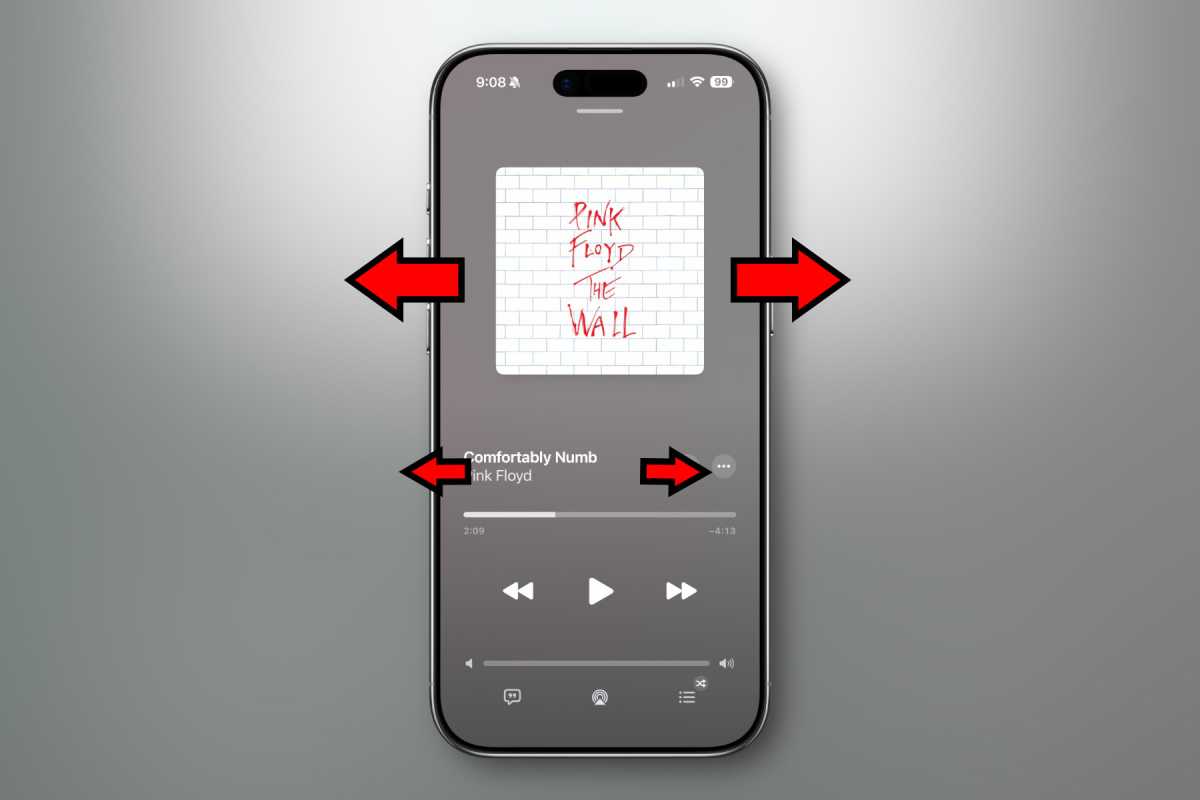
    Apple Music swiping

    Foundry

    But that’s not the only place swiping navigation was added in iOS 26.1. While playing music, you’ll see a little “miniplayer” at the bottom whenever you leave the Now Playing screen. This miniplayer can also be swiped left and right to change tracks.
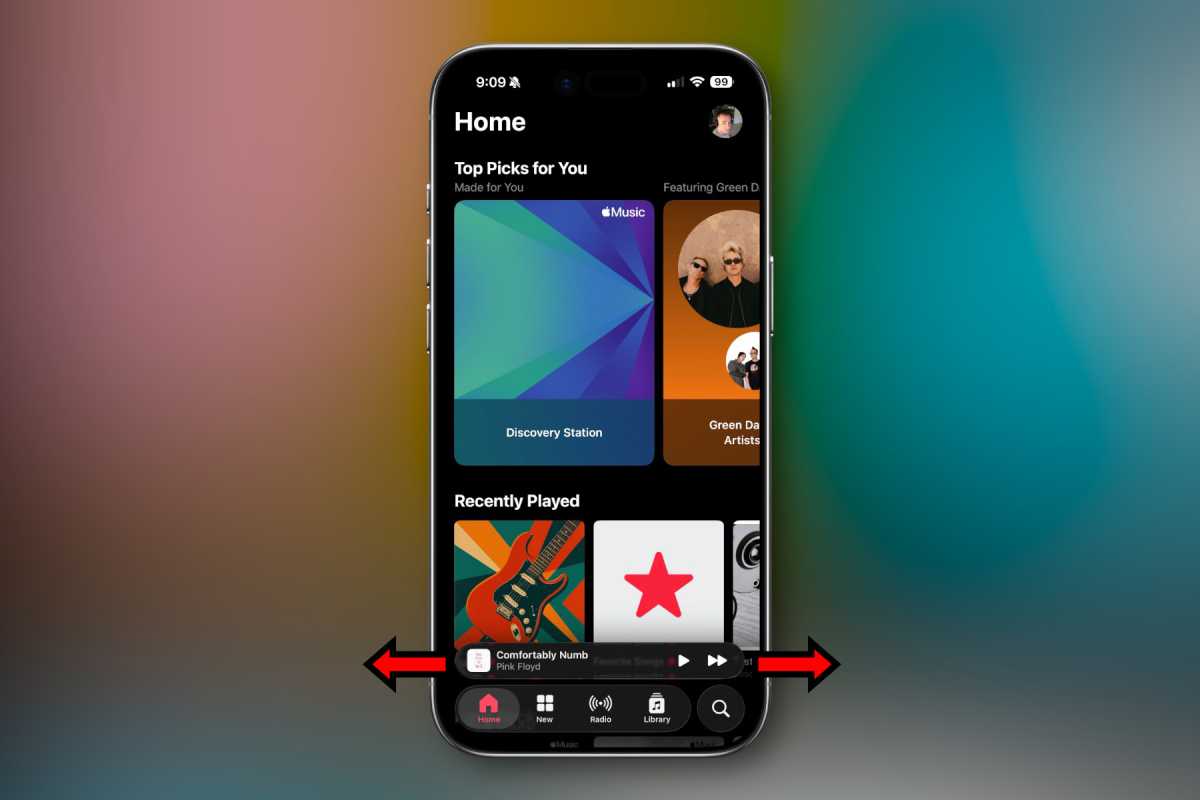
    Apple Music swiping

    Foundry

    Importantly, this isn’t a change to how you navigate in Apple Music, it’s an addition. If you like the buttons, they’re still there and work as they always have.

    Note that iOS 26.1 is currently in beta testing, and there is always a chance, however unlikely, that this change goes away before release.

    Share. Facebook Twitter Pinterest LinkedIn Tumblr Email
    Admin
    • Website

    Related Posts

    Lenovo Surges In Global Coverage

    Apple’s new Upgrade program lets you lease an iPhone, Mac, Watch, and iPad

    Open Secure AI Alliance aims to open-source AI security defences

    HSBC chooses Singapore for global AI centre of excellence

    Add A Comment
    Leave A Reply Cancel Reply

    Editors Picks

    Most Impressive Team Streaks Of The 21st Century: Where Does 2024-26 Spain Rank?

    NBC’s ‘Stumble’ is a mockumentary about a cheer team with plenty of tumbling runs and heart

    Xiaomi shares post worst week in 3½ years as accidents stoke EV safety concerns

    Judge reverses Trump administration’s cuts of billions of dollars to Harvard University

    Top Reviews
    9.1

    Review: Mi 10 Mobile with Qualcomm Snapdragon 870 Mobile Platform

    By Admin
    8.9

    Comparison of Mobile Phone Providers: 4G Connectivity & Speed

    By Admin
    8.9

    Which LED Lights for Nail Salon Safe? Comparison of Major Brands

    By Admin
    Sg Latest News
    Facebook X (Twitter) Instagram Pinterest Vimeo YouTube
    • Get In Touch
    © 2026 SglatestNews. All rights reserved.

    Type above and press Enter to search. Press Esc to cancel.