

Close Menu

    Subscribe to Updates

    Get the latest creative news from FooBar about art, design and business.

    What's Hot

    AEM patent infringement dispute continues as Advantest files amended complaint

    Access Denied

    Modern day tips to achieve mindfulness in todays Stressful World

    Facebook X (Twitter) Instagram
    Facebook X (Twitter) Instagram Pinterest VKontakte
    Sg Latest NewsSg Latest News
    • Home
    • Politics
    • Business
    • Technology
    • Entertainment
    • Health
    • Sports
    Sg Latest NewsSg Latest News
    Home»Technology»Stop Letting Facebook Harvest Your Photos
    Technology

    Stop Letting Facebook Harvest Your Photos

    AdminBy AdminNo Comments2 Mins Read
    Facebook Twitter Pinterest LinkedIn Tumblr Email
    Share
    Facebook Twitter LinkedIn Pinterest Email


    It was at least a few months ago when word got out that Facebook wanted to access everyone’s photo gallery to help train its AI models. Thanks to a recent writeup from The Standard, this practice is in the headlines again, so while we’re on the subject, we’d like to take this time to tell everyone to absolutely opt out of this nonsense.

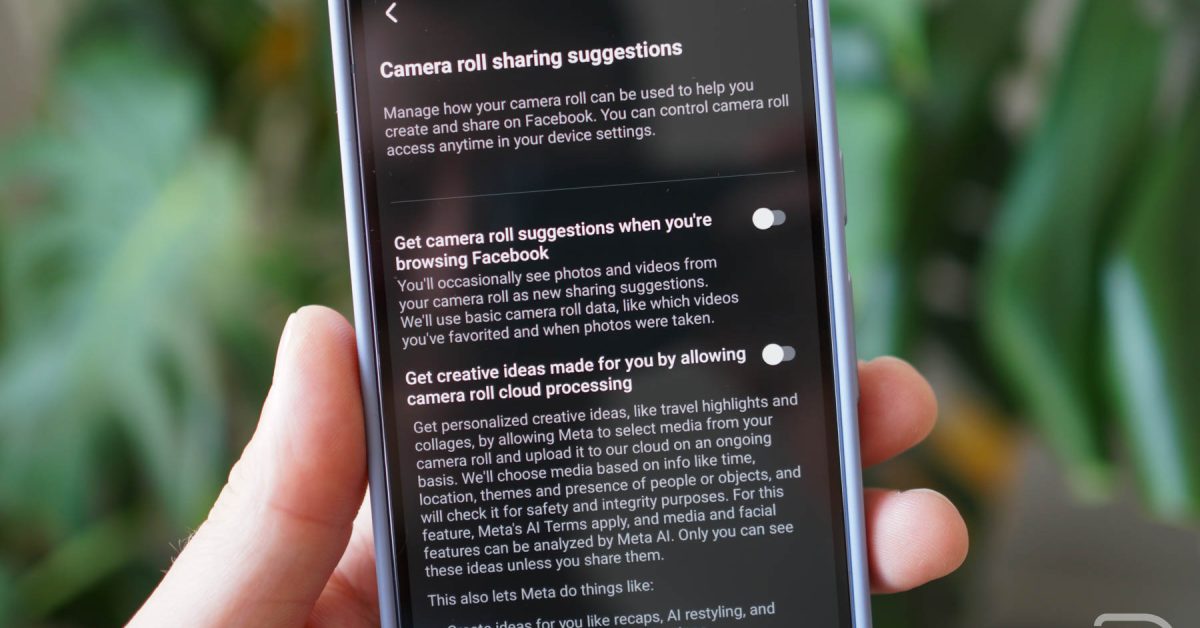
    There are two settings inside of Facebook that need to be disabled if you don’t want the company digging through your photos “on an ongoing basis.” The settings are “Get camera roll suggestions when you’re browsing Facebook” and “Get creative ideas made for you by allowing camera roll cloud processing.”

    The second one is the most egregious. When enabled, it allows Meta to harvest from your camera roll on an “ongoing basis.” The setting says, “We’ll choose media based on info like time, location, themes, and presence of people or objects,” meaning the company uploads photos from your phone and analyzes them without any real notification to the user. The sell is that you can get neat photo suggestions automatically, but the cost of giving over your camera roll on an ongoing basis to Zuckerberg is way too high for that.

    I don’t know about any of you, but I don’t want Facebook using my private photos to train its AI. Thanks, but no thanks.

    How to Disable

    1. Open the menu inside the Facebook app
    2. Click on Settings and privacy
    3. Click Settings
    4. Scroll until you see “Camera roll sharing suggestions”
    5. Disable both features

    And if you’re someone who doesn’t have Facebook because you’re so hip, we salute you. Some of us don’t have much of a choice when it comes to staying connected to friends and family. It sucks, but we can at least try to limit how much data these companies steal from us.

    Share. Facebook Twitter Pinterest LinkedIn Tumblr Email
    Admin
    • Website

    Related Posts

    Access Denied

    Mississippi homeowners blame a noisy data center plant for sleepless nights. The mayor’s advice? “Consider selling.”

    How a dispute over e-commerce firm Coupang is testing US-South Korea ties

    VA’s push to shorten benefits forms needs more public input

    Add A Comment
    Leave A Reply Cancel Reply

    Editors Picks

    Most Impressive Team Streaks Of The 21st Century: Where Does 2024-26 Spain Rank?

    NBC’s ‘Stumble’ is a mockumentary about a cheer team with plenty of tumbling runs and heart

    Xiaomi shares post worst week in 3½ years as accidents stoke EV safety concerns

    Judge reverses Trump administration’s cuts of billions of dollars to Harvard University

    Top Reviews
    9.1

    Review: Mi 10 Mobile with Qualcomm Snapdragon 870 Mobile Platform

    By Admin
    8.9

    Comparison of Mobile Phone Providers: 4G Connectivity & Speed

    By Admin
    8.9

    Which LED Lights for Nail Salon Safe? Comparison of Major Brands

    By Admin
    Sg Latest News
    Facebook X (Twitter) Instagram Pinterest Vimeo YouTube
    • Get In Touch
    © 2026 SglatestNews. All rights reserved.

    Type above and press Enter to search. Press Esc to cancel.