


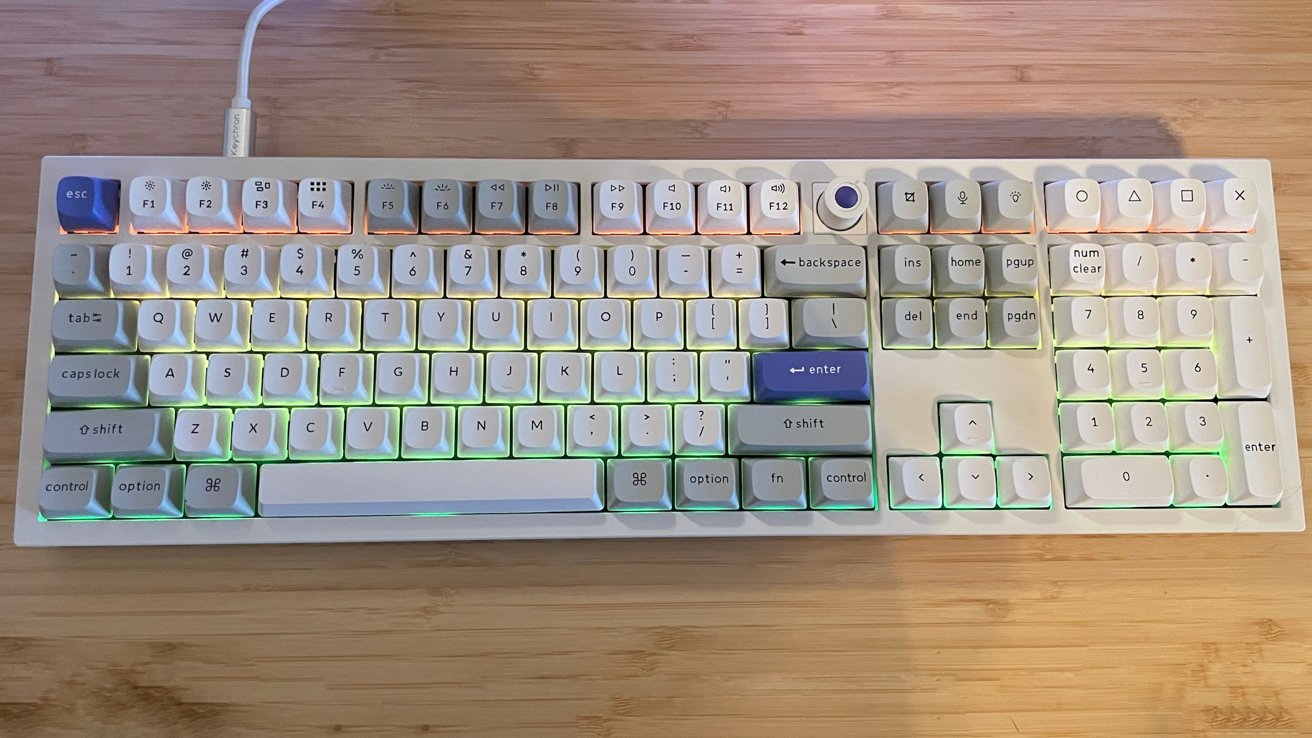
The Keychron Q6 HE 8K is a solid mechanical keyboard with magnetic switches. While it’s not cheap, it’s got more than enough to give a great typing experience on Mac.
When it comes to mechanical keyboards, Keychron stands out as one of the industry leaders. All thanks to its vast array of styles, colors, and features aimed at both Windows and macOS users.
The Keychron Q6 HE 8K is a beefy new release, and I put it through an extended test drive in my ongoing series of reviews of Keychron products. It’s an ever-continuing search for the mechanical keyboard that will earn a permanent position on my workspace.
The Q6 HE 8K is a full-size magnetic switch mechanical keyboard with an 8K polling rate that supports a direct wired connection. It has a staggering variety of customizations.
Keychron Q6 HE 8K Review: Specifications
- Size: 137 x 446mm
- Front Height: 20.6 mm (without keycaps)
- Back Height: 31.37 mm (without keycaps)
- Feet Height: 1.24mm
- Angle: 5.26 degrees
- Weight: 2,268g +/- 10g
- Body Material: Aluminum
- Keycap: OSA double-shot PBT keycaps
- Plate Material: Aluminum
- Switch: Keychron Ultra-fast Lime Magnetic Switch
- Stabilizer: Screw-in PCB stabilizer
- Backlight: South-facing RGB LED
- Compatible System: macOS/Windows/Linux
- Operating Environment: -10 to 50C
- Connectivity: Type-C Wired
- Polling Rate: 8000 Hz / 4000 Hz / 1000 Hz
- N-Key Rollover (NKRO): Yes
- Rapid Trigger: Yes
- Sensitivity: 0.01 mm
- Adjustable Actuation Points: 0.1 – 3.35mm
- Dynamic Keystrokes: 4-in-1 action keys
- Hot-Swappable: Yes, compatible with Keychron Ultra-fast Lime Magnetic Switch only.
- MCU: 1MB
Keychron Q6 HE 8K Review: Unboxing
The Q6 HE 8K arrives in a standard black box with a metallic Keychron logo. The keyboard and accessories are packaged in heavy foam cutouts for maximum travel safety.
- 1x Fully Assembled Keyboard
- 16x Gaskets (12 Installed and 4 in the Box)
- 8 sets x Stabilizers
- 1 set x Keycaps (PBT Double-shot)
- 1 set x Magnetic Switches
- 1x Type-C Cable
- 1x Type-A to Type-C Adapter
- 1x Keycap & Switch Puller
- 1x Screwdriver
- 1x Hex Key
- User Guide
Keychron Q6 HE 8K Review: Build Quality
The Q6 HE 8K is a full-size mechanical keyboard with a metal case. Even by the industry standards for a keyboard of this size, I was surprised by the sheer weight and feel of it.
This is a very beefy keyboard that will easily withstand the rigors of daily use, at stationary or mobile workspaces alike.
Keychron offers the Q6 HE 8K in two colors: Black or white. That’s it.

Keychron Q6 HE 8K Review: Left side with Mac keyset
This is a recurring theme with Keychron and their keyboards, and I have written about it in the past. But with the amazing quality of its keyboards, I would love to see it expand its range of colors.
I’ll be the first to admit I do not know its manufacturing limitations with such meticulously engineered products. But even so, the occasional red, blue, green, or pink would be welcome in this age of colorful workspaces and peripherals.
The Q6 HE 8K arrives with the proprietary Keychron Ultra-fast Lime Magnetic Switches as standard. Keychron sells Banana and Silent Red switches on the Keychron website for an added cost of $29.99, depending on the type of sound level or tactile feel you prefer.
Keychron products never feel cheap or like an afterthought. Every keyboard it makes uses premium materials and engineering built to last for years.
The Q6 HE 8K is certainly no exception. From the heavy aluminum case and double-gasket design to the double-shot keycaps, PCB stabilizers, adapters, and tools, everything in the box feels like bespoke, white-glove service.

Keychron Q6 HE 8K Review: Rear has USB-C and two control switches
The back of the Q6 HE 8K includes a USB-C port for connection and use. There are two switches next to the USB port.
One switch is a three-position switch to toggle between up to three potential keyboard configuration profiles. The second switch moves between default macOS and Windows configurations.
Keychron Q6 HE 8K Review: Customization
The Q6 HE 8K has a wide variety of customization options, including third-party keycaps and remapping variations available from Keychron’s proprietary Keychron Launcher tool. The pool of possibilities is very deep.
Keychron touts that the Q6 HE 8K is truly customizable from top to bottom, and it is. By default, Keychron includes keycaps for both macOS and Windows configurations.
The switches on the Q6 HE 8K are hot-swappable, with Keychron noting that hot-swapping works with Keychron Lime and Gateron Jade magnetic switches.
The new Keychron screw-in PCB stabilizers deliver incredible stability on the big keys, namely the space bar, shift, enter, and delete. The installation is quick and easy for experienced users and mechanical keyboard newbies alike.

Keychron Q6 HE 8K Review: Managing the actuation distance in the Keychron Launcher
The south-facing RGB lights on the Q6 HE 8K are vibrant and fully customizable to each individual key, using Keychron’s Per-Key RGB feature. The contrast of the bright lights against the white metal body and keycaps makes everything pop.
Keychron’s Launcher tool is web-based, and it allows you to adjust almost everything. Adjustments span keymapping, the internal RGB light configuration, and adding custom macros for use with the Q6 HE 8K.
Previous versions of the Keychron Launcher did not play well with macOS and several browsers. The process is incredibly smooth now. It’s nice to see a manufacturer like Keychron listen to the concerns of their customers and address them.
Keychron Q6 HE 8K Review: In use
I used the Q6 HE 8K for several weeks prior to writing this review, and it was the best Keychron experience I have had to date. That is, in a line of good Keychron experiences.
On my standard workspace layout, I use a digital pen display and stylus with my right hand. A wireless, low-profile keyboard is used by my left hand for key commands.
I need to move the tablet and the keyboard around often throughout my workday. I find most full-size keyboards to be cumbersome in this space, but despite its size, weight, and wired connection, the Q6 HE 8K handled the job incredibly well.

Keychron Q6 HE 8K Review: Right side with numpad and knob
I’ll admit, I tested this as my work keyboard only to be thorough and see how the Q6 HE 8K behaves at work and at play. I expected to dislike the work experience based on my personal preferences, but I was surprised by how well the keyboard worked for me.
I had a few initial hours where my muscle memory for low-profile keyboards worked against me, with a series of missed clicks or a bit of fatigue with the larger keycaps. That passed in time, and I found the size and weight of the Q6 HE 8K to be a welcome change.
Where I expected the Q6 HE 8K to excel was in my gaming space on my Windows machine. It lived up to everything I anticipated and more.
The weighty keyboard provides stability, and the ability to customize every key actuation point and utilize the LKP (last key priority) and DKS (dynamic keystrokes) opened up an entire world for me. Think pressure sensitivity adjustments and absolute control with games like Marvel Rivals, where quick, responsive actions are vital.
I am an older gamer, so experiencing these features for the first time truly made me feel a bit like a caveman cracking rocks together with my previous basic keyboard and mouse. Meanwhile, other gamers are building rockets.

Keychron Q6 HE 8K Review: Full top-down view
The Q6 HE 8K is not the quietest mechanical keyboard I have ever used. If I decide to get one for my gaming desk, I will absolutely purchase and use the Silent Red switches from Keychron.
The bumpy-clack of the standard switches is nice, but it is not my preference.
The volume adjustment push knob on the Q6 HE 8K is amazing, and it is a simple quality-of-life feature that I love. It isn’t something I expected, and the clickable knob made quick muting feel satisfying.
Keychron Q6 HE 8K Review: An excellent mechanical keyboard
The Q6 HE 8K is an amazing mechanical keyboard, and I recommend it for gamers.
The retail price of the Q6 HE 8K is $239, and that is not anywhere close to inexpensive or budget-friendly for most. But the price is worth it if you are looking for a rock-solid mechanical keyboard.
Keychron Q6 HE 8K Pros
- High build quality
- Great for daily typing
- Excels at gaming
- Excellent customization options in Keychron software
Keychron Q6 HE 8K Cons
- High entry price for keyboards
- Case color options are limited
Rating 4.5 out of 5
Where to buy the Keychron Q6 HE 8K
The Keychron Q3 HE is available on the Keychron website for $239. It’s also available from Amazon,
